Real-time Desktop Streaming on M5Stack Cardputer via H.264
Background
It’s been five years since I first tinkered with ESP32 streaming on a messy breadboard.
At that time, the setup was built on a breadboard, featuring a 1.14” screen with a 240x135 resolution, powered by the original ESP32. That post described the implementation details in depth.
Five years later, I decided to revisit this project and migrate the hardware environment to the M5Stack Cardputer.

Additional Note
My Cardputer has been manually upgraded. The original main controller was an ESP32-S3FN8 (8MB built-in Flash, no PSRAM), which I replaced with an ESP32-S3FH4R2.
I sacrificed 4MB of Flash to gain 2MB of PSRAM.
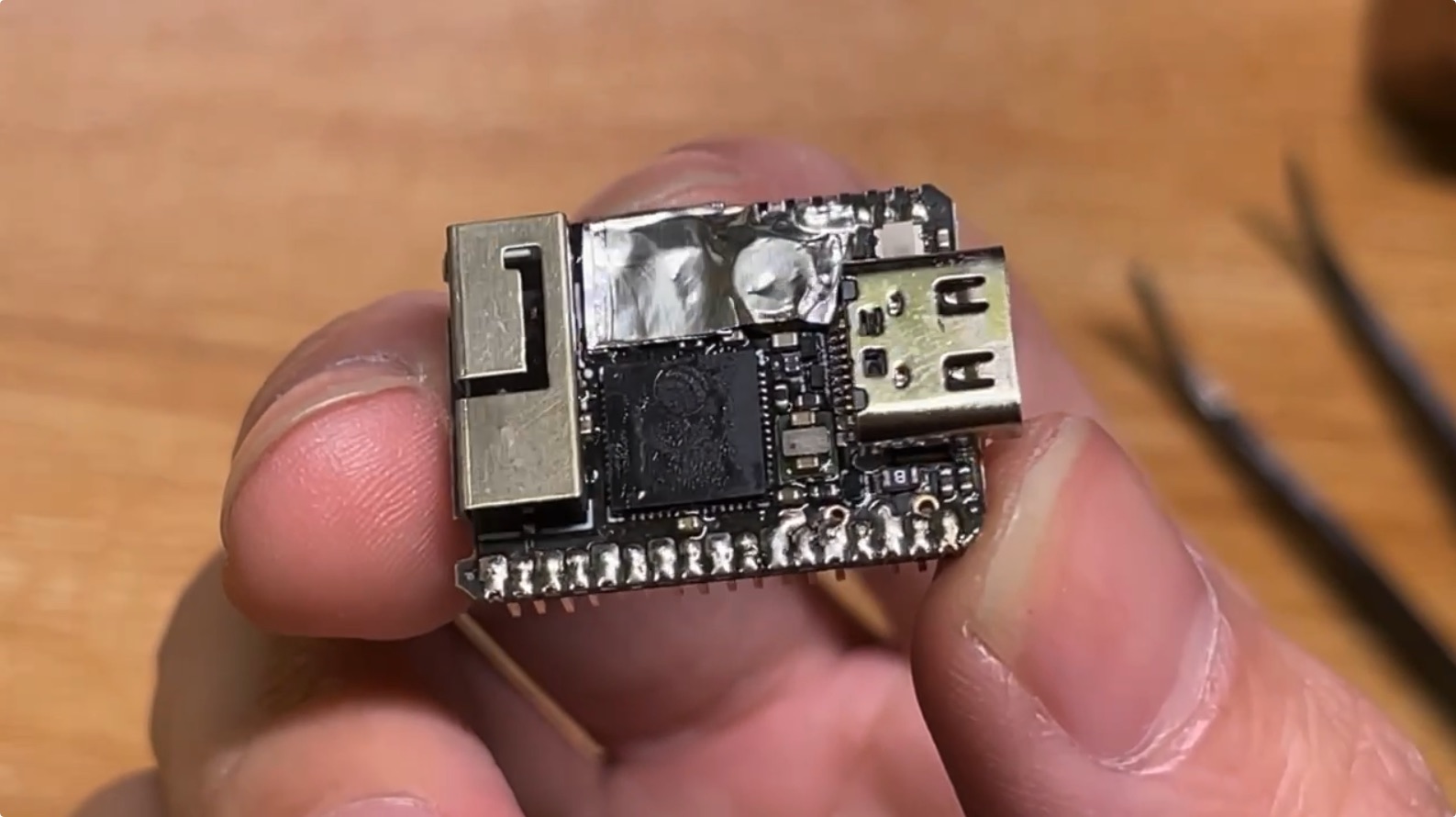
The image above shows a close-up of the chip replacement. To protect the surrounding delicate SMD components, I used aluminum foil tape for heat insulation. You can still see some flux residue around the solder joints—it might not look pretty, but it gave this little machine “new life.”
Why PSRAM is Mandatory: The “SRAM-Only” Experiment
Before deciding to swap the chip, I tried extensively to get H.264 decoding running on the PSRAM-less original Cardputer. It turned out to be nearly a “Mission Impossible.”
H.264 software decoders have rigid memory requirements. Even at a low resolution like 240x136, the DPB (Decoded Picture Buffer) mechanism and SPS activation require large, contiguous blocks of memory. After running the WiFi stack, TCP/IP, and WebSocket service, the internal SRAM of the ESP32-S3 has very little contiguous space left.
I tried some extreme optimizations to save memory:
- Removing LVGL UI: Switched to bare-metal display control, reclaiming ~50KB.
- Squeezing System Components: Reduced WiFi dynamic TX buffers from 32 to 4 and static RX buffers to 3, saving ~45KB.
- Discarding Double Buffering: Implemented a “Decode -> Convert -> Push to Screen” synchronous model to eliminate display redundancy.
Despite reclaiming over 100KB, the esp-h264 library still failed during initialization because it couldn’t allocate enough contiguous working memory.
Conclusion: For H.264, which relies on reference frames, PSRAM is a “life-saver” for ESP32-S3. If you want to play with real-time video streams, manually soldering a PSRAM-capable chip is the most efficient solution.
System Architecture
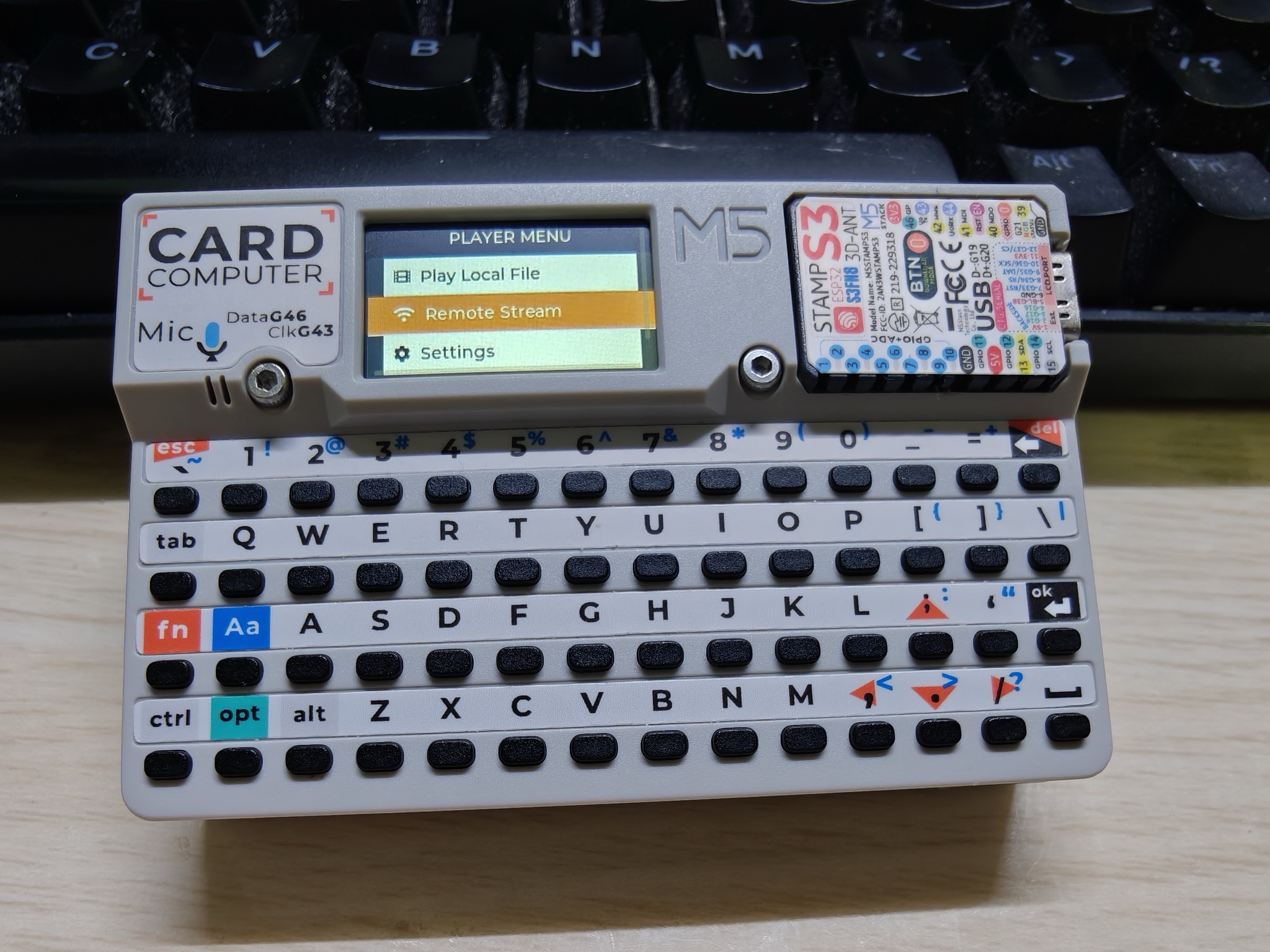
With the extra PSRAM, I can perform H.264 stream decoding directly on the device.
Espressif provides a component called esp_h264, which enables software decoding on the ESP32-S3. My tests showed that 2MB of PSRAM is just enough to support 240x136 decoding (the screen is 240x135, but H.264 requires even dimensions).
Communication Pipeline
To ensure ultra-low latency, I redesigned the communication architecture:
- Sender (Browser): Uses the browser’s
getDisplayMediato capture the desktop, encodes it usingWebCodecsinto H.264 Annex B format (set to GOP=1 for I-frame only mode), and sends the binary data over WebSocket. - Receiver & Buffer (ESP32-S3): The Cardputer acts as a WebSocket Server, receiving data and storing it in a
RingBufferfor smoothing. - Decryption/Decoding Core: A dedicated decoding task pulls raw byte streams from the RingBuffer and decodes them into YUV420P images using
esp_h264. - Color Conversion & Display: Decoded images are converted to RGB565 in real-time and pushed directly to the ST7789 screen via SPI DMA.
Key Challenges & Solutions
1. Multi-core Scheduling & Watchdog (WDT) Errors
In early versions, decoding, color conversion, screen refresh, and LVGL UI updates all ran on the same core. This caused the CPU usage to spike, frequently triggering Task Watchdog resets.
Solution:
- Core Affinity: Core 0 handles the WiFi stack, WebSocket service, and LVGL UI tasks.
- Dedicated Decoding Core: Core 1 is assigned as a high-priority task, solely responsible for H.264 decoding, YUV-to-RGB conversion, and LCD bitmap refreshing.
This strategy ensures that even when the decoding task is under heavy load, the system components can still “feed the dog,” ensuring stability.
2. Memory Management
The esp_h264 decoder requires significant contiguous memory. Even with GOP=1, it still allocates space for reference frame management.
I allocated all the decoder’s working buffers to PSRAM, while keeping the high-performance double display buffers and SPI descriptors in the faster Internal RAM.
3. “Frame-Catching” Algorithm for Latency
Network jitter is the enemy of streaming. If data accumulates in the buffer due to transient bandwidth drops, the display will experience increasing latency.
Since I use an all-I-frame stream, I implemented a simple “catching” algorithm:
Before processing, the decoding task checks the RingBuffer’s occupancy. If it detects multiple frames waiting, it discards all older frames and only decodes/displays the latest one. This trick allows the device to snap back to real-time visuals the moment network conditions recover.
Controller Design
This time, I didn’t use Python. Instead, I launched a lightweight Web Server directly on the Cardputer to provide a frontend console. The frontend uses DaisyUI for a modern interface and displays real-time bitrates and traffic statistics.
To fit the ESP32-S3’s processing power, I tuned the WebCodecs configuration:
- Bitrate: 150 - 300 kbps (highly bandwidth efficient)
- Keyframe Interval: High frequency
- Resolution: Forced to 240x136
Conclusion
From frequent WDT crashes to stable 240x135 @ 15-20 FPS streaming, this project explores the performance limits of the ESP32-S3.
Compared to the breadboard setup from five years ago, this Cardputer solution is more complete (no Python bridge required) and features significant improvements in multi-core optimization and memory management. Even on a microcontroller, you can achieve a truly extreme streaming experience.
Hardware Suggestion: An ESP32-S3 model with PSRAM is required.
Real-time Desktop Streaming on M5Stack Cardputer via H.264
https://chaosgoo.com/en/make-remote-streaming-on-m5stack-cardputer/