Introduction
Recently, in order to improve the user experience of my site, I decided to conduct a targeted performance optimization using PageSpeed Insights analysis.
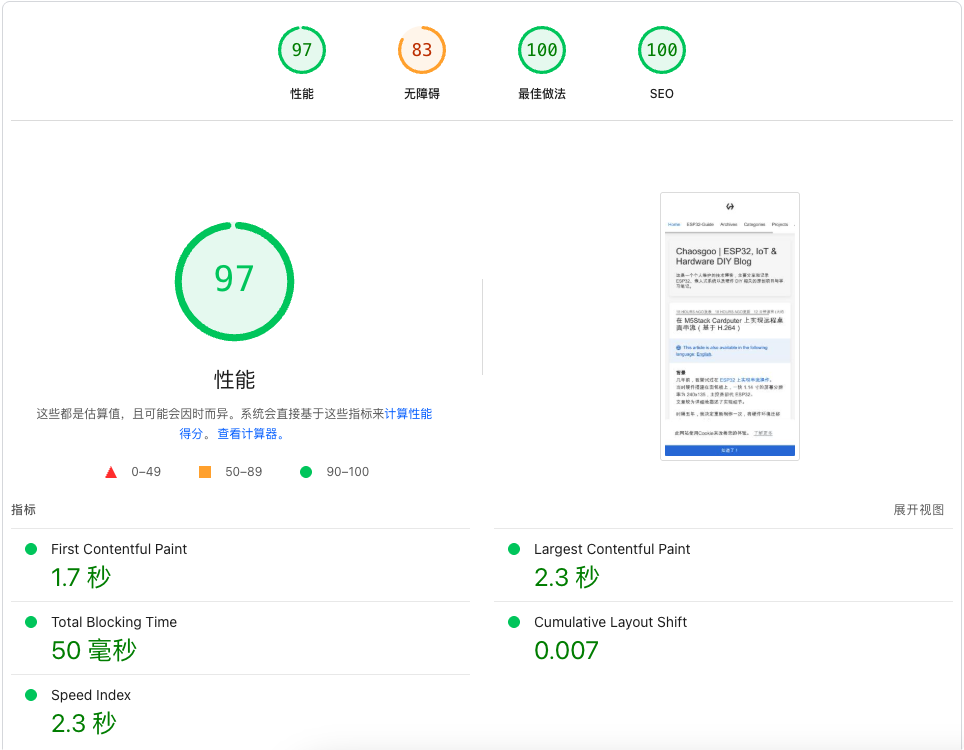
Initially, I optimized the site based on the Cactus theme, raising the score from 47 to 94. During the writing of this post, I switched the theme to Icarus, which caused some previous optimizations to become invalid. The mobile score plummeted to 53 overnight. I had to start over, but by applying the same methodology, I eventually pushed the PageSpeed Insights score to 97.
Initial Status Analysis
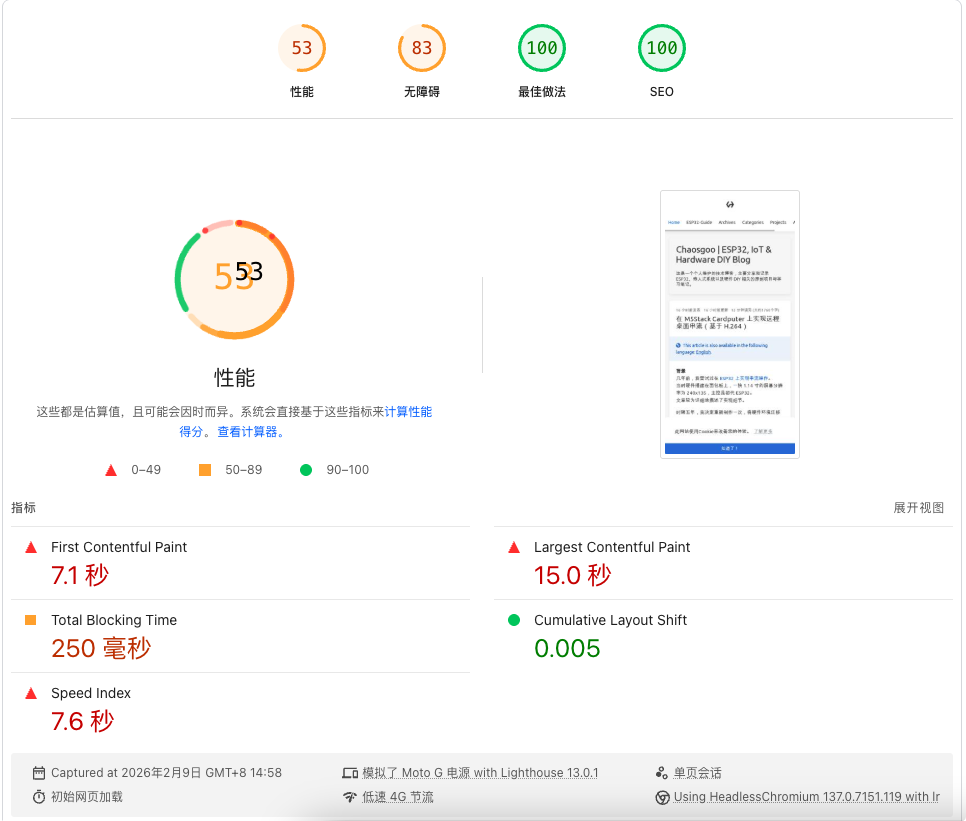
The PageSpeed Insights report highlighted the following major issues:
| Metric | Initial Value | Issue |
|---|---|---|
| First Contentful Paint (FCP) | 7.1s | Too Slow |
| Largest Contentful Paint (LCP) | 15.0s | Severely Slow |
| Cumulative Layout Shift (CLS) | 0.339 | Significant Shift |
| Speed Index | 5.2s | Poor Experience |
Note: Metrics varied during different test runs, but the core issues remained the same.
Key performance bottlenecks included:
- Oversized Font Files: MesloLG font in TTF format was as large as 636KB.
- Font Awesome CSS: Loaded the full icon library (~19KB) even though only a few icons were used.
- Missing Preconnect: No preconnect hints for critical resources like CDN.
- Unoptimized Images: The Logo image was 447x432 but displayed at 88x88.
- Layout Shift: Images lacked width/height attributes, causing CLS issues.
Round 1: Resource Slimming
1. Font Format Conversion (TTF → WOFF2)
WOFF2 is currently the most efficient Web font format, offering compression rates far superior to TTF.
# Convert font using ttf2woff2
npx ttf2woff2 < MesloLGS-Regular.ttf > MesloLGS-Regular.woff2Result: 636KB → 160KB, a 75% reduction.
Then update the font reference in CSS to prioritize WOFF2:
@font-face
  font-style: normal
  font-family: "Meslo LG"
  font-display: swap
  src: local("Meslo LG S"),
       url("../lib/meslo-LG/MesloLGS-Regular.woff2") format("woff2"),
       url("../lib/meslo-LG/MesloLGS-Regular.ttf") format("truetype")
2. Add Preconnect Hints
Add resource preconnects in the <head> to allow the browser to establish TCP connections in advance:
<link rel="preconnect" href="https://cdnjs.cloudflare.com" crossorigin />
<link rel="dns-prefetch" href="https://cdnjs.cloudflare.com" />
<link
  rel="preconnect"
  href="https://pagead2.googlesyndication.com"
  crossorigin
/>
<link rel="preconnect" href="https://www.googletagmanager.com" crossorigin />
3. Logo Optimization
The original Logo was 447x432 pixels, but only needed 88x88 for display.
sips (Scriptable Image Processing System) is a built-in command-line image processing tool on macOS. You can perform image resizing and format conversion without installing any third-party software.
# Resize image using sips
sips -z 88 88 Logo_Sketch.png --out Logo_Sketch_88.pngNote: If you are using Linux or need more complex image processing, you can use ImageMagick’s
convertcommand as an alternative.
Result: 32KB → 7.6KB, a 76% reduction.
4. Fixing CLS Layout Shift
Add explicit dimension attributes to the Logo image:
<img id="logo" src="/images/Logo_Sketch_88.png" width="50" height="50" />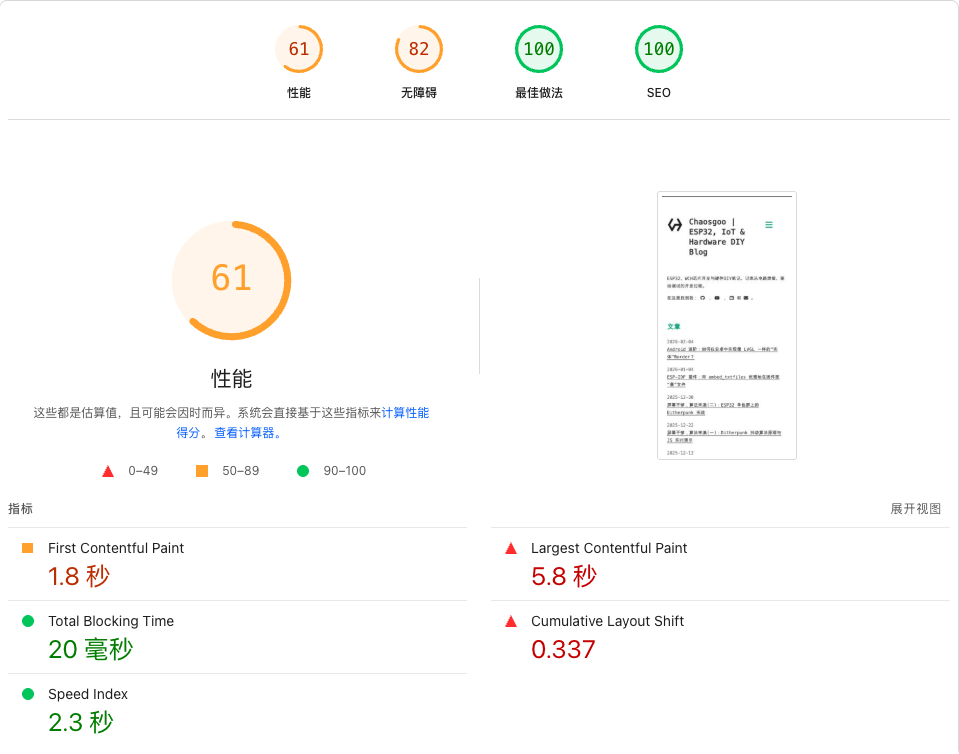
Score after Round 1: 53 → 61
Round 2: Removing Font Awesome
Analysis showed that the Font Awesome CSS was about 19KB, plus even larger font files, but I only used the following icons:
- ☰ Menu Icon (fa-bars)
- ‹ › Pagination Arrows (fa-angle-left/right)
- Social Media Icons (GitHub, YouTube, Bilibili, etc.)
Solution: Replace with SVG
1. Menu Icon
<!-- Before -->
<i class="fa-solid fa-bars fa-2x"></i>

<!-- After -->
<svg
  xmlns="http://www.w3.org/2000/svg"
  width="24"
  height="24"
  viewBox="0 0 24 24"
  fill="none"
  stroke="currentColor"
  stroke-width="2"
>
  <line x1="3" y1="12" x2="21" y2="12"></line>
  <line x1="3" y1="6" x2="21" y2="6"></line>
  <line x1="3" y1="18" x2="21" y2="18"></line>
</svg>
2. Pagination Arrows
Use Unicode characters directly:
<!-- Before -->
<i class="fa-solid fa-angle-left"></i>

<!-- After -->
‹
3. Social Media Icons
Create an SVG icon mapping object:
var svgIcons = {
  github:
    '<svg xmlns="http://www.w3.org/2000/svg" width="16" height="16" viewBox="0 0 24 24" fill="currentColor"><path d="M12 0C5.37 0 0 5.37 0 12c0 5.31..."/></svg>',
  youtube: "<svg ...>...</svg>",
  bilibili: "<svg ...>...</svg>",
  // ...
};
Then remove the Font Awesome CSS reference:
<!-- Remove this line -->
<link rel="stylesheet" href="/lib/font-awesome/css/all.min.css" />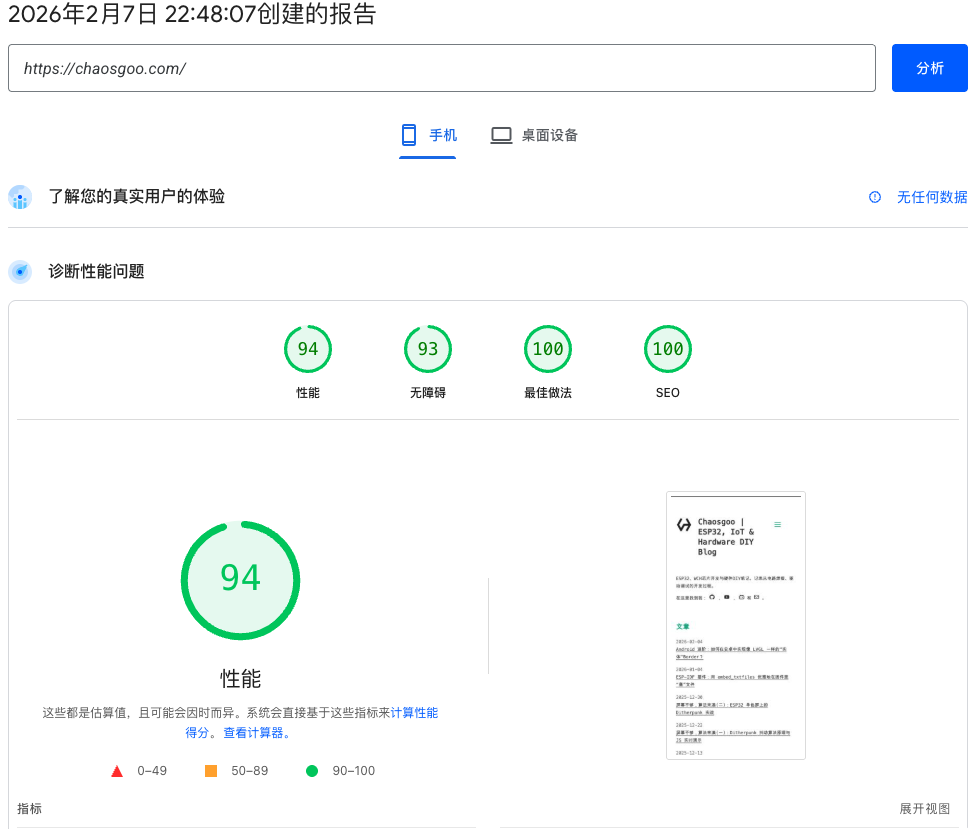
Score after Round 2: 61 → 94 (Mobile), 100 (Desktop)
Why is removing Font Awesome so effective?
The core logic lies in the collapse of the “Critical Request Chain.”
Before: The browser had to go through a 4-level waterfall: HTML → style.css → all.min.css → fa-solid-900.woff2. Each level requires a full RTT (Round Trip Time). On a slow mobile network, this is how 2.4s of latency accumulates.
After: SVGs are inlined directly in the HTML byte stream. When the browser parses the icon’s position, the drawing instructions are already ready. The request chain length drops from 4 to 0.
When I opened the browser’s Network panel and saw all.min.css slowly performing its handshake, subsequently triggering the download of two 100+KB font files, I couldn’t sit still. The entire page was left blank for 2 seconds just for those few pagination arrows and menu icons.
Why I finally decided to “ax” Font Awesome: In Android development, we would never integrate a multi-MB SDK just to display three icons. But in Web development, including
all.min.cssseems to have become a “default operation.”
Round 3: SEO & Broken Link Fixes
While pursuing performance, I discovered an overlooked SEO issue: dead links in the source code.
1. Eliminate /page/0/ 404 Links
Many Hexo themes (including Icarus) have a pagination logic that works like this:
- On the first page, the “Previous” button is set to
is-invisible(hidden visually) via CSS, but the HTML source still generates<a href="/page/0/">Previous</a>. - Search engine crawlers (like Googlebot) ignore CSS styles and follow the
href. Since/page/0/doesn’t exist, this leads to numerous 404 errors, dragging down the site’s authority.
Solution: Localized Component Rewrite
I extracted the paginator.jsx component locally and modified the rendering logic:
// Before: Generates <a> regardless
<div class="pagination-previous">
    <a href={getPageUrl(current - 1)}>{prevTitle}</a>
</div>

// After: Renders as <span> when there is no valid page, eliminating the link physically
<div class={`pagination-previous${current > 1 ? '' : ' is-invisible'}`}>
    {current > 1 ? <a href={getPageUrl(current - 1)}>{prevTitle}</a> : <span>{prevTitle}</span>}
</div>
2. Remove Blocking Progress Bar (Pace.js)
The report showed pace.min.js as a long chain request. Although it shows a page loading progress bar:
- It is located in the
<head>, making it a blocking resource. - It does nothing to help LCP (Largest Contentful Paint) and instead consumes network bandwidth.
Operation: Disable it directly in _config.icarus.yml.
Round 4: Modern Image Formats & Adaptive Sizing
After solving code and font issues, the only remaining “heavyweight” in the PageSpeed Insights suggestions was Image Resources.
The report pointed out two main problems:
- Oversized Images: For example, a 1536px wide cover image displaying at ~360px on mobile, wasting huge amounts of bandwidth and slowing down LCP.
- Legacy Formats: Still using JPG/PNG instead of WebP, which offers far better compression.
Solution: Automated WebP Conversion & Resizing
To solve this fundamentally, I wrote an automated script based on the Node.js sharp library to clean up main images across the site:
// Script logic summary: Automated batch processing
const sharp = require("sharp");
// ...
await sharp(src)
  .resize({ width: 600 }) // Limit width to 600px (article container width)
  .webp({ quality: 80 }) // Convert to WebP
  .toFile(dest);
Specific Optimization Cases
-
Ditherpunk Demo Image (
returnofobradinn)- Before: 533KB (JPG)
- After: ~26KB (WebP, 672px)
- Reduction: ~95%. This was decisive for the LCP improvement.
-
Post Cover Image (
esp32_dither_cover)- Before: 1536x1587 resolution (533KB)
- After: 672x694 resolution (~28KB)
- Adaptive Sizing: Strictly matched container width (672px), eliminating “Oversized Image” warnings.
-
M5Stack Cardputer Cover (
cardputer-streaming-cover)- Before: 1200x900 resolution
- After: 600x450 resolution (~20KB)
- For pages with smaller display areas, the width was further limited to 600px to match the actual rendering size (599px).
-
Sidebar Thumbnails
- Before: ~20KB (original image shrunk)
- After: ~3KB (WebP, 120px)
- Generated specialized 120px micro-versions to avoid loading large images for small icons.
-
Site Logo
- Before: PNG format (32KB)
- After: WebP format (8.1KB) with transparent background support.
Further Squeeze: Adjusting Compression Factor
While converting to WebP helped, the default quality of 80 was still overkill for some large images. PageSpeed Insights suggested “Efficiently encoding images,” so I re-processed them with higher compression:
// Using sharp's extreme compression parameters
.webp({
    quality: 65,      // Lower quality to 65
    alphaQuality: 65, // Also compress the Alpha channel
    effort: 6,        // Enable highest level of compression (uses more CPU for smaller size)
    smartSubsample: true
})
These small optimizations added up, eventually maxing out the LCP score. Total image volume across the site was reduced by over 1MB.
Round 5: Eliminating Critical Request Chain Blocking
Even after optimizing images and fonts, PageSpeed Insights still flagged a 441ms “Critical Request Chain” block, caused by CSS requests to fonts.googleapis.com and subsequent font downloads.
Although we introduced local WOFF2 fonts in Round 1, the Hexo theme (layout/common/head.jsx) still loaded Google Fonts (Ubuntu, Source Code Pro) by default.
Actions
- Remove Google Fonts: Commented out the Google Fonts loading code in the theme. Since we already configured a local font stack (Meslo LG / System Fonts), this was safe and immediately saved 441ms of blocking time.
- Async Load Non-Critical CSS: For code highlighting styles (
atom-one-light.css), which don’t affect initial content reading (LCP elements are usually titles or cover images), I switched to asynchronous loading:
<!-- Before: Render-blocking -->
<link rel="stylesheet" href="/css/atom-one-light.css" />

<!-- After: Explicit preload + Async application -->
<link
  rel="preload"
  as="style"
  href="..."
  onload="this.onload=null;this.rel='stylesheet'"
/>
<noscript><link rel="stylesheet" href="..." /></noscript>
After these “surgeries,” the critical request chain depth dropped from 5 to 2, and FCP (First Contentful Paint) was significantly reduced.
Conclusion
While writing this article, I initially used the
hexo-cactus-theme. During the process, I switched tohexo-icarus-theme. When I first switched to Icarus, the score dropped below 60. However, by applying the optimization principles described here—even with a home page that displays images instead of pure text like Cactus—the score eventually reached 97.
| Optimization | Original (Icarus Default) | Optimized | Reduction |
|---|---|---|---|
| MesloLG Font | 636KB (TTF) | 160KB (WOFF2) | 75% |
| Logo Image | 32KB | 8.1KB | 74% |
| Image Resources | JPG/PNG (Oversized) | WebP (Adaptive) | > 90% |
| Font Awesome | ~19KB + Font | 0KB (Inline SVG) | 100% |
| Google Fonts | 441ms Block | 0ms (Removed) | 100% |
| Preconnect hints | None | 4 preconnects | - |
| CLS Score | 0.339 | ~0 | - |
| PageSpeed Score | Icarus Initial | Optimized |
|---|---|---|
| Mobile | 53 | 97 |
| Desktop | 67 | 100 |
Lessons Learned
- Fonts are a major factor: Web fonts are often overlooked performance killers; WOFF2 is the preferred format.
- Use icon libraries sparingly: If you only use a few icons, inlined SVG is much more efficient than loading a whole library.
- Images on demand: Ensure image dimensions match their display dimensions.
- Preconnect works: For necessary third-party resources,
preconnectcan save DNS + TCP time. - CLS is easy to fix: Giving images explicit dimension attributes can avoid most layout shifts.
- Cache Lifecycle (TTL): Beyond resource size, use a CDN like Cloudflare to force long-term caching for static assets (
Cache-Control: max-age=31536000). This ensures that when a user visits a second article, fonts and CSS load instantly from the Disk Cache.
Tools Recommended
- PageSpeed Insights - Google’s official performance testing tool.
- WebPageTest - Detailed waterfall analysis.
- Squoosh - Google’s online image compression tool.
- ttf2woff2 - Tool for converting TTF to WOFF2.
Hope this article helps you! If you are also optimizing your website’s performance, feel free to reach out and exchange ideas.