Let your ESP32 try streaming
(Updated November 2025) This article was written 5 years ago, but it is still one of my most trafficked articles. The core principle of ‘PC to ESP32 real-time streaming’ it demonstrates - namely ‘Python frame capture/encoding’ + ‘custom TCP protocol’ + ‘ESP32 decoding/DMA rendering’ - this architecture is still of great reference value today.
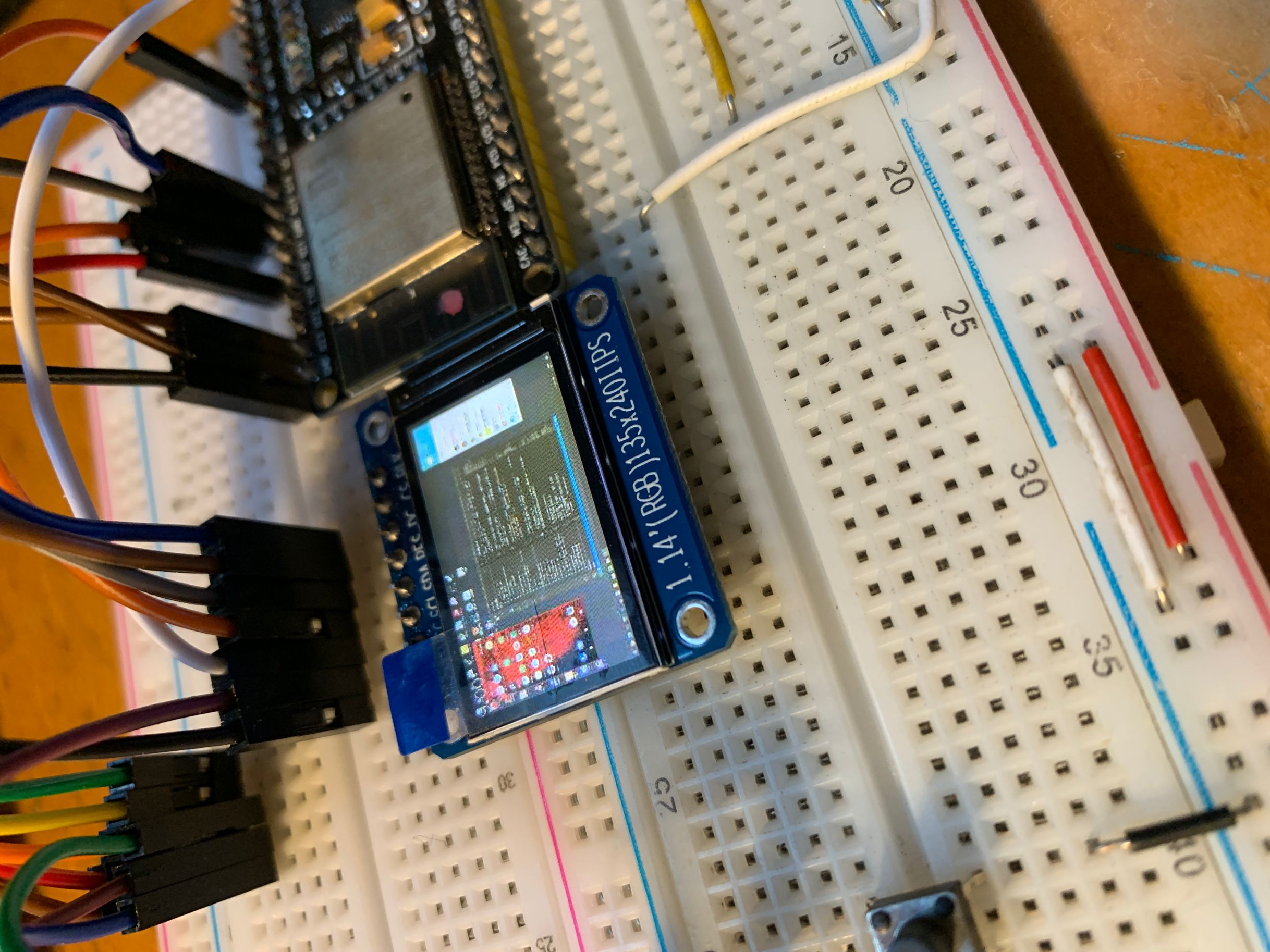 Now that we have a screen and a network, wouldn’t it be possible to stream?
preface
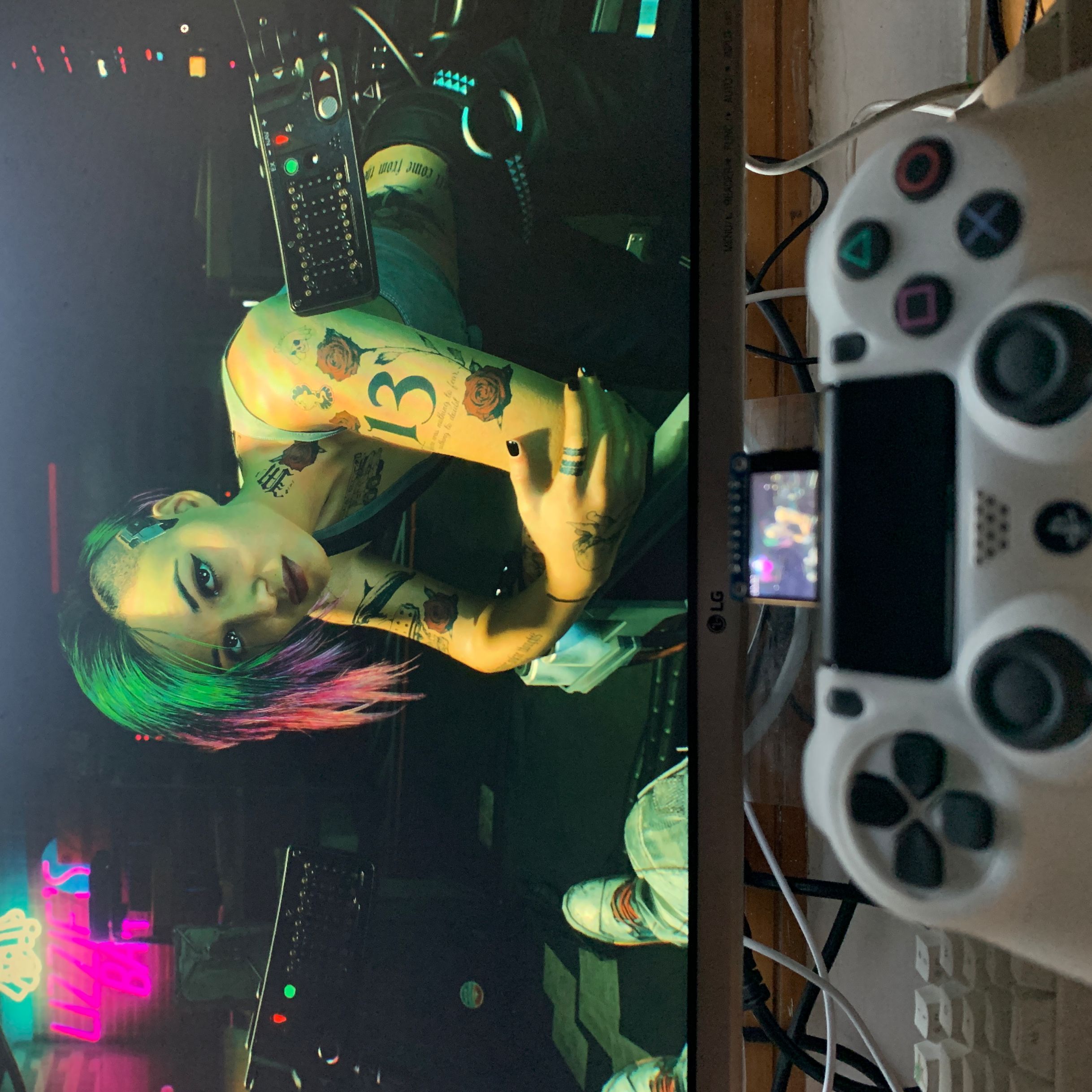
This time we come to the whole life. Use ESP32 to display the computer screen! It doesn’t matter if you are using another screen. As long as ESP32 is used with TFT_eSPI, it can be achieved, but the frame rate will be different. This video shows you the running effect on M5StickC Now it’s Genshin Impact that has nothing but gameplay @bilibili
Implementation method
The computer serves as the sending end, responsible for sending image data -> EPS32 serves as the receiving end, responsible for receiving and drawing image data The sender is written in python, uses the mss module to capture the screen, and then uses python opencv to encode it into JPG.
The receiving end is written in C++, TJpg_Decoderdecoding, TFT_eSPIdrawing
The data sent is in frames. In order to reduce the size of the frame, the original bitmap data of each frame will be encoded in JPG. After ESP32 receives the data, it first decodes the JPG and then draws it.
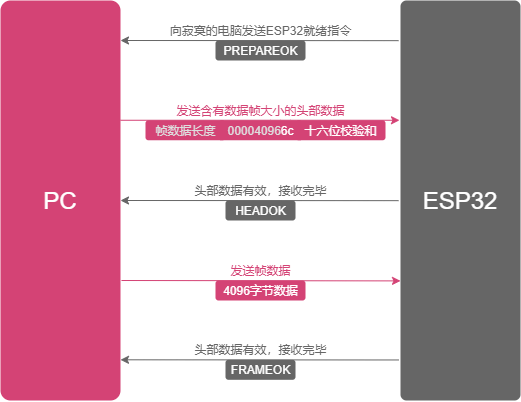
A complete communication process is:
streamlined code
To allow the Python host computer to communicate with the host computer C++, the first step is to define a ‘protocol’. Instead of using complicated HTTP, I designed a minimalist 3-step handshake protocol (PREPAREOK, HEADEROK, FRAMEOK) to ensure that frame data will not be lost or misplaced
##ifndef COMMON*MACRO_H*
##define COMMON*MACRO_H*

// Debug情况下,暂时不去测试串流,也无需连接wifi
##define DEBUG

/_
======================串流相关======================
_/
// 帧数据接收完毕
##define FRAMEOK 0x01
// 头部接收完毕,接收帧
##define HEADEROK 0x02
// 准备完毕,接收头部 注:0x03无法正常发送
// https://www.cnblogs.com/young525/p/5873795.html
##define PREPAREOK 0x41

/_
======================屏幕相关======================
_/
##define SCREEN_WIDTH 240
##define SCREEN_HEIGHT 135

/_
======================WiFi相关======================
_/
##define ssid "CloseWrt_2.5G"
// WiFi 密码
##define password "have5seeds"

##endif
On the ESP32 (receiving end), I encapsulated all the logic into a StreamingComponent class. Its core is a state machine (IDLES, RUNNING) and two key buffers: a headerBuffer (used to receive frame size) and a wifiBuffer (used to receive JPG data)
##ifndef STREAMINGCOMPONENT*H*
##define STREAMINGCOMPONENT*H*

##define IDLES 0
##define RUNNING 1
##define EXITING 2

##include <TFT_eSPI.h>
##include <TJpg_Decoder.h>
##include <WiFi.h>

##include "utils.h"
##include "common_macro.h"

class StreamingComponent {
public:
StreamingComponent(WiFiClient &clt, TFT_eSPI &tft);

    uint8_t status = IDLES;

    void enter();
    void exit();

    void loop();


    bool drawCallBack(int16_t x, int16_t y, uint16_t w, uint16_t h,
                      uint16_t *bitmap);

// ~StreamingComponent() {
// Serial.printf("~StreamingComponent\n");
// free(wifiBuffer);
// free(headerBuffer);
// free(frameSizeBuffer);
// };

private:
// WiFiClient指针
WiFiClient *client;
// TFT_eSPI指针
TFT_eSPI *Tft;
// 帧率相关
double fps_avg = 0.0;
uint32_t sec{}, psec{};
uint16_t fps = 0, frame_count = 0;
// 帧率相关

    // 执行时间相关
    // 函数执行时间
    uint32_t cost{};
    // 一次loop执行时间
    uint32_t loopCost{};

    // 缓冲部分

    // 帧数据大小
    uint16_t size{};
    // 已经下载帧数据大小
    uint16_t bSize{};
    // DMA缓冲相关
    // 2020.12.04若出现发送端发送超过wifiFrameSize大小(32kb),
    // 则会导致出错,而此处无法分配更大内存。
    // 暂时未找到正确开启SPIRAM方法
    // 2020.12.04将图片压缩方式从LZO改为jpg
    const int wifiFrameSize = 1024 * 32;
    // 头数据大小
    const int headerFrameSize = 10;
    // 待下载的jpg图片缓冲
    uint8_t *wifiBuffer =
            (uint8_t *) heap_caps_malloc(wifiFrameSize, MALLOC_CAP_8BIT);
    // 头数据缓冲
    uint8_t *headerBuffer =
            (uint8_t *) heap_caps_malloc(headerFrameSize, MALLOC_CAP_8BIT);
    // 帧数据大小缓冲,用于解析字符串为int
    uint8_t *frameSizeBuffer =
            (uint8_t *) heap_caps_malloc(headerFrameSize - 1, MALLOC_CAP_8BIT);
    // DMA 双缓冲模式
    uint16_t dmaBuffer1[16 * 16]{};  // Toggle buffer for 16*16 MCU block, 512bytes
    uint16_t dmaBuffer2[16 * 16]{};  // Toggle buffer for 16*16 MCU block, 512bytes
    uint16_t *dmaBufferPtr = dmaBuffer1;
    // 当前使用的DMA缓冲
    bool dmaBufferSel = 0;
    /**
     * 显示回调,用于Tjpeg
     * 2020-12-06
     */

    /**
     * 接收数据
     * 2020-12-01
     * size: 5222 bytes
     * cost: 16 ms
     */
    void onReceiveData();

};

##endif
The core of the implementation is onReceiveData(). In this function, it first waits for PREPAREOK, then reads the 10-byte ‘header’, parses out the frame size (size), and then sends HEADEROK; then it starts to receive the JPG image of size bytes and stores it in wifiBuffer.
##include "StreamingComponent.h"

StreamingComponent::StreamingComponent(WiFiClient &clt, TFT_eSPI &tft) {
this->client = &clt;
this->Tft = &tft;
Serial.println("StreamingComponent Constuctor");
};

void StreamingComponent::enter() { status = RUNNING; };

void StreamingComponent::exit() { status = EXITING; };

void StreamingComponent::loop() {
if (status == RUNNING) {
Serial.println("StreamingComponent loop");
loopCost = millis();
onReceiveData();
Serial.printf("fps_avg:%f,loop cost:%d ms\n", fps_avg, millis() - loopCost);
Tft->drawString(String(fps_avg), 0, 0, 2);
} else if (status == EXITING) {
// 啥也不做
}
};

bool StreamingComponent::drawCallBack(int16_t x, int16_t y, uint16_t w,
uint16_t h, uint16_t \*bitmap) {
if (status == RUNNING) {
if (y >= SCREEN_HEIGHT) return 0;
if (dmaBufferSel) {
dmaBufferPtr = dmaBuffer2;
} else {
dmaBufferPtr = dmaBuffer1;
}
dmaBufferSel = !dmaBufferSel;
Tft->pushImageDMA(x, y, w, h, bitmap, dmaBufferPtr);
}
return true;
}

// ~StreamingComponent() {
// Serial.printf("~StreamingComponent\n");
// free(wifiBuffer);
// free(headerBuffer);
// free(frameSizeBuffer);
// };

void StreamingComponent::onReceiveData() {
Serial.println("StreamingComponent onReceiveData");
StreamingComponent::client->write(PREPAREOK);
Serial.println("StreamingComponent client.write(PREPAREOK);");
cost = millis();
if (headerBuffer == nullptr) {
Serial.printf("headerBuffer is null.\n");
} else {
client->readBytes(headerBuffer, headerFrameSize);
Serial.printf("receive header cost:%d ms\n", millis() - cost);
}

int sum = checkSum((const char _)headerBuffer, 8);
// Serial.printf("headerBuffer checkSum: %d\n", sum);
if ((sum & 0xf) == c2i(headerBuffer[9]) &&
(sum >> 4) == c2i(headerBuffer[8])) {
// 有效头数据,准备接收帧数据
strncpy((char _)frameSizeBuffer, (char _)headerBuffer, 8);
frameSizeBuffer[9] = '\0';
size = atoi((char _)frameSizeBuffer);
// Serial.printf("valid header frame size: %d bytes\n", size);
} else {
// 无效头数据,丢弃
// Serial.printf("invalid header\n");
return;
}

client->write(HEADEROK);
// // Serial.printf("send HEADEROK\n");
cost = millis();
bSize = 0;
if (wifiBuffer == NULL) {
Serial.printf("wifiBuffer is null.\n");
Serial.printf("MALLOC_CAP_8BIT heap_caps_get_largest_free_block: %d.\n",
heap_caps_get_largest_free_block(MALLOC_CAP_8BIT));
Serial.printf("MALLOC_CAP_32BIT heap_caps_get_largest_free_block: %d.\n",
heap_caps_get_largest_free_block(MALLOC_CAP_32BIT));
Serial.printf("MALLOC_CAP_SPIRAM heap_caps_get_largest_free_block: %d.\n",
heap_caps_get_largest_free_block(MALLOC_CAP_SPIRAM));
Serial.printf("MALLOC_CAP_8BIT: %d.\n",
heap_caps_get_free_size(MALLOC_CAP_8BIT));
Serial.printf("MALLOC_CAP_32BIT: %d.\n",
heap_caps_get_free_size(MALLOC_CAP_32BIT));
Serial.printf("MALLOC_CAP_SPIRAM: %d.\n",
heap_caps_get_free_size(MALLOC_CAP_SPIRAM));
} else {
bSize = client->readBytes(wifiBuffer, size);
Serial.printf("frame size: %d bytes, receive frame cost:%d ms\n", bSize,
millis() - cost);
}

if (bSize > 64 && bSize == size) {
cost = millis();
Tft->startWrite();
TJpgDec.drawJpg(0, 0, wifiBuffer, bSize);
Tft->endWrite();
frame_count++;
sec = millis() / 1000;
if (psec != sec) {
psec = sec;
fps = frame_count;
fps_avg = (fps_avg + fps) / 2.0;
frame_count = 0;
}

    // 31ms
    Serial.printf("draw cost:%d ms\n", millis() - cost);

} else {
// 无效帧,丢弃
// return;
}
client->write(FRAMEOK);
// // Serial.printf("send FRAMEOK\n");
}
##ifndef LIB*UTILS_H*
##define LIB*UTILS_H*

##include <stdint.h>
##include "TFT_eSPI.h"

int checkSum(const char\* src, int length);
int c2i(char ch);

int getTextWidth(const char\* text, TFT_eSprite &sprite);

int getTextWidth(const char* text, TFT_eSprite *sprite);
##endif
##include "utils.h"

/\*\*

- @brief 计算16校验和计算
- @param src 待校验内容
- @param length 待校验内容长度
- @retval 校验和
- */
  int checkSum(const char *src, int length) {
  int16_t sum = 0;
  for (int i = 0; i < length; i++) {
  sum += src[i];
  }
  sum = (sum & 0xff) + (sum >> 16);
  return ~sum & 0xff;
  }

/\*\*

- @brief 16进制字符转int
- @param ch 待转换内容
- @retval 校验和
- \*/
  // https://www.cnblogs.com/lidabo/p/3995055.html
  int c2i(char ch) {
  // 如果是数字,则用数字的ASCII码减去48, 如果ch = '2' ,则 '2' - 48 = 2
  if (isdigit(ch)) return ch - 48;

// 如果是字母,但不是A~F,a~f则返回
if (ch < 'A' || (ch > 'F' && ch < 'a') || ch > 'z') return -1;

// 如果是大写字母,则用数字的ASCII码减去55, 如果ch = 'A' ,则 'A' - 55 = 10
// 如果是小写字母,则用数字的ASCII码减去87, 如果ch = 'a' ,则 'a' - 87 = 10
if (isalpha(ch)) return isupper(ch) ? ch - 55 : ch - 87;

return -1;
}

int getTextWidth(const char\* text, TFT_eSprite &sprite){
return sprite.textWidth(text);
}

int getTextWidth(const char* text, TFT_eSprite *sprite){
return sprite->textWidth(text);
}
On the PC (sending side), Python scripts are the exact ‘opposite’ of C++ logic. It captures the screen using mss, compresses it into a JPG using cv2.imencode (this is key to reducing bandwidth), then waits for the ESP32’s ‘handshake signal’ and sends the ‘headers’ and ‘frame data’ accordingly.
##pragma GCC optimize("O3")
##include <stdint.h>

##include <TFT_eSPI.h>
##include <TJpg_Decoder.h>
##include <WiFi.h>
##include <Wire.h>
##include "StreamingComponent.h"

// 第三方基础组件
// WiFi客户端实例
WiFiClient client;
// 显示屏驱动实例
TFT_eSPI Tft = TFT_eSPI();

// 自定义对象
StreamingComponent \*streaming;

bool drawCallback(int16_t x, int16_t y, uint16_t w, uint16_t h,
uint16_t \*bitmap) {
streaming->drawCallBack(x, y, w, h, bitmap);
return true;
}

void main_setup() {
// 配置串口
Serial.begin(115200);
// 配置显示
Tft.init();
Tft.setRotation(1);
Tft.fillScreen(TFT_BLACK);
Tft.initDMA();
// 配置TJpeg
TJpgDec.setJpgScale(1);
TJpgDec.setSwapBytes(true);
// 设置TJpg解码器回调函数
TJpgDec.setCallback(drawCallback);
// 配置WiFi
client.setTimeout(1);
WiFi.begin(ssid, password);
delay(1000);
if (WiFi.status() == WL_CONNECTED) {
const int httpPort = 715;
client.connect("192.168.10.207", httpPort);
Serial.println("Socket Connected");
}

    // 用户自定义对象初始化区
    streaming = new StreamingComponent(client, Tft);
    streaming->status = RUNNING;

}

void setup() {
main_setup();
}

void loop() {
streaming->loop();
}
import socket
import time
from multiprocessing import Process, Queue,Value,Manager
from multiprocessing.sharedctypes import Array
import ctypes
from mss.tools import to_png
import cv2
import lzo
import mss
import numpy as np

ip = "0.0.0.0"
port = 715
fps = 0

def main():
global fps # 1. 创建套接字 socket
if True:
tcp_server_socket = socket.socket(socket.AF_INET, socket.SOCK_STREAM) # 2. 绑定本地信息 bind
tcp_server_socket.bind((ip, port)) # 3. 让默认的套接字由主动变为被动 listen
tcp_server_socket.listen(128)
print("启动TCP服务器\r\n" + f'启动在{ip}:{port}上') # 4. 等待客户端的链接 accept
print("等待客户端的链接\r\n")
new_client_socket, client_addr = tcp_server_socket.accept()
print(f'当前链接:{client_addr}')
frame_buffer = grab_screen_to_buffer(0, 0, 1920, 1080)
start_time = time.time()
while True:
s = time.time()
recv = new_client_socket.recv(1)
if recv == b'\x41': # 客户端就绪,发送头数据
start_time = time.time()
header = len(frame_buffer.tobytes())
header = package_header(header)
new_client_socket.sendall(header)
end_time = time.time()
cost = end_time - start_time # print("客户端就绪,发送头数据")
elif recv == b'\x02': # 客户端准备头部接收完成,发送帧数据
new_client_socket.sendall(frame_buffer.tobytes())
frame_buffer = grab_screen_to_buffer(0, 0, 1920, 1080) # print("客户端准备头部接收完成,发送帧数据")
elif recv == b'\x01': # pass # 客户端准备帧数据接收完成,等待客户端就绪 # print("客户端准备帧数据接收完成,等待客户端就绪")
end_time = time.time()
cost = end_time - start_time
print("Backend FPS:{:.2f}".format(1.0 / cost))

### grab screen by left top width height

def grab_screen_to_buffer(l, t, w, h):
monitor = {"top": t, "left": l, "width": w, "height": h}
with mss.mss() as sct:
sct_frame = sct.grab(monitor)
img = np.array(sct_frame)
img = cv2.resize(img, dsize=(240, 135)) # img = cv2.cvtColor(img, cv2.COLOR_BGR2BGR565) # print("bmp no comporess size:{}",len(img.tobytes())) # print("bmp lzo comporess size:{}",len(lzo.compress(img.tobytes(), 9, False)))
quality = 60
encode_params = [cv2.IMWRITE_JPEG_QUALITY,quality,cv2.IMWRITE_JPEG_PROGRESSIVE,0]
retval, img = cv2.imencode(".jpg", img, encode_params) # with open("write.jpg", "wb") as f: # f.write(img.tobytes()) # img = img[..., ::-1] # print("jpg no comporess size:{}",len(img.tobytes())) # print("jpg lzo comporess size:{}",len(lzo.compress(img.tobytes(), 9, False)))
return img

def package_header(size):
data = num_package(size)
header = ''.join(data).encode() + hex(check_sum(data)).encode()[2:]
return header

## 校验和

def check_sum(value):
s = 0
for d in value:
s += ord(d)
s = (s & 0xff) + (s >> 16)
return ~s & 0xff

## 打包数字

def num*package(num):
if num < 100000000:
li_str = list(str(num))
result = ['0' for * in range(8)]
for index, item in zip(range(len(li*str)), li_str):
result[-index + len(li_str) - 1] = item
return result[::-1]
else:
return ['9' for * in range(6)]

if **name** == '**main**':
time.sleep(1)
main()
Preview
References
The following contents are materials that have been referenced in actual development. Some of the solutions in the materials have been abandoned and are not reflected in the above code. They are hereby listed, but I still want to express my sincere gratitude to them.
- Install lzo and python-lzo in windows environment
- https://github.com/lzfcc/LearnArduino
- ESP32 official documentation (5) Serious error
- ESP32-CAM: Connect to ILI9341 LCD screen