- Implementing variable fonts (Variable Font) in LVGL - Chapter 1
- Implementing variable fonts (Variable Font) in LVGL-Chapter 2
- Implementing variable fonts (Variable Font) in LVGL-Chapter 3
Preface
(November 2025 remastered version description): I published the first version of this article on a third-party platform (Jianshu + Bilibili) and received a total of 50,000+ views and a large number of developer feedback. In order to provide a better reading experience, I have optimized the layout and part of the content of the article and published it exclusively on this personal blog
I don’t know how long ago I saw MIUI updated the “dynamic font system” function, but I didn’t pay much attention to it at the time (after all, I’m not using MIUI, hahaha, but it’s really convenient). The demo video showed the function of adjusting the font thickness at will. Later I learned that this parameter is called font weight (the fourth tone of zhong).
Then one time when I went to Material.io, I saw Material You concept video on the home page. After the phone is unlocked, the font of the system time changes from thin to thick. The effect is very similar to the effect when the MIUI dynamic font system adjusts the font weight above.
I have heard about LVGL for a long time, but have never taken any action.
Later I saw Peak of Zhihui Jun and X-Track of FASTSHIFT, and I was extremely envious. So I decided to try LVGL this time to see what it feels like to use it.
I had been tinkering with the GUI for a while, but ended up giving up.
This time I plan to directly use a mature GUI solution like LVGL, and LVGL happens to support FreeType. With the help of FreeType, the above font weight animation can be relatively easily achieved.
What is FreeType
The FreeType library is a completely free (open source), high-quality and portable font engine
The current mainstream screens are all composed of pixels and cannot directly display vector images, so a font engine is required to convert the vector data of the font into bitmap data, and then display “Light up” on the screen.
What is Variable Font?
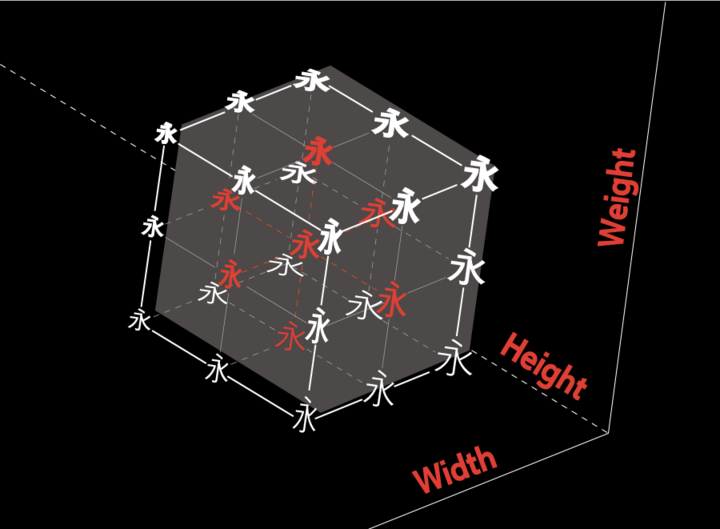 Variable fonts that store outline change data automatically generate rich changing shapes based on the initial font outline, allowing users to freely adjust the appearance of text.
Rather than boring descriptions, it’s better to get started and experience it directly. V-Fonts is a website for online experience of variable fonts. By dragging the slider, you can modify the value of the font on the corresponding axis, which is the above-mentioned free adjustment of the appearance of the text.
Variable fonts that store outline change data automatically generate rich changing shapes based on the initial font outline, allowing users to freely adjust the appearance of text.
Rather than boring descriptions, it’s better to get started and experience it directly. V-Fonts is a website for online experience of variable fonts. By dragging the slider, you can modify the value of the font on the corresponding axis, which is the above-mentioned free adjustment of the appearance of the text.
Preparation
Preparation workInstall Visual Studio first
Download LVGL emulator
I planned to write another article about installing the emulator, but when I reinstalled it, I discovered that it can be installed with just one click.
(You may need to go online scientifically) Just copy the git command and you’re done. After downloading, click LVGL.Simulator.sln to start it directly.
git clone --recurse-submodules https://github.com/lvgl/lv_sim_visual_studio.git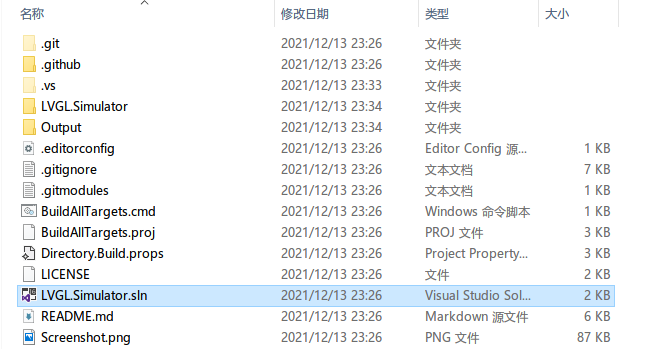 After starting, you can see the running effect of lv_demo_widgets() that comes with lvgl.

Configure FreeType for LVGL
Thanks to the completeness of lv_sim_visual_studio, freetype was downloaded together with git clone —recurse-submodules just now. So there is no need to configure anything additional for now, but in other cases you still need to manually configure LVGL’s FreeType support. (For example, when running freetype on the board)
LVGL built-in FreeType Demo
Place LVGL.Simulator.cpp within
// ----------------------------------
// Demos from lv_examples
// ----------------------------------
lv_demo_widgets();           // ok
// lv_demo_benchmark();
// lv_demo_keypad_encoder();    // ok
// lv_demo_music();             // removed from repository
// lv_demo_printer();           // removed from repository
// lv_demo_stress();            // ok

// ----------------------------------
// LVGL examples
// ----------------------------------
Modify to
// ----------------------------------
// Demos from lv_examples
// ----------------------------------

// lv_demo_widgets();           // ok
// lv_demo_benchmark();
// lv_demo_keypad_encoder();    // ok
// lv_demo_music();             // removed from repository
// lv_demo_printer();           // removed from repository
// lv_demo_stress();            // ok
lv_example_freetype_1();
// ----------------------------------
// LVGL examples
// ----------------------------------
If everything goes well, click Run. You will see the following picture
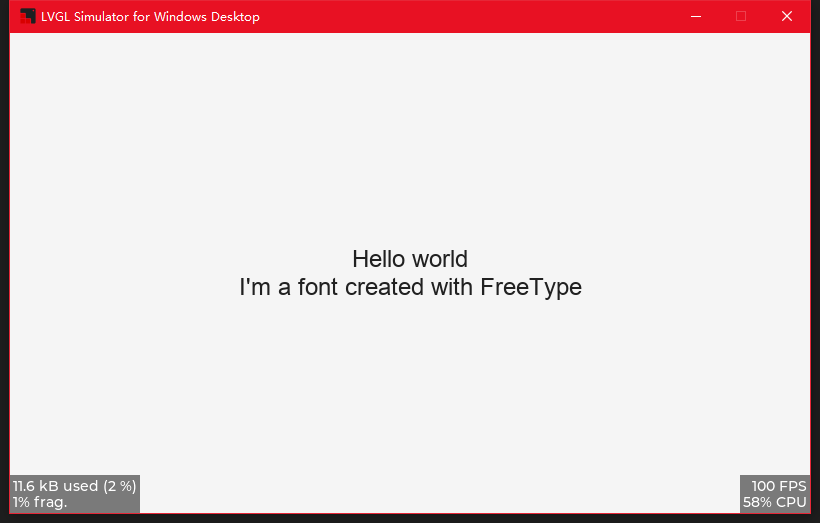
The following is the content of lv_example_freetype_1. I have added detailed Chinese comments for it.
/\*\*

- 使用FreeType加载字体
  _/
  void lv_example_freetype_1(void)
  {
  /_ 创建字体结构体 info _/
  static lv_ft_info_t info;
  /_ FreeType 使用 C standard 文件系统, 所以不需要盘符 _/
  /_ 目前程序在Windows上运行, 根目录为LVGL.Simulator.c所在文件夹 \*/
  // 希望使用的字体的所在位置,即它的路径
  info.name = "./lvgl/examples/libs/freetype/arial.ttf";
  // 希望生成字体的高度, 这里叫作weight感觉挺奇怪的,weight应该是字重的英文
  // [update-2021.12.17] 作者这里是一个失误,但是为了兼容性就没更正
  // [Issues](https://github.com/lvgl/lv_lib_freetype/issues/17)
  info.weight = 24;
  // 字体的风格
  info.style = FT_FONT_STYLE_NORMAL;
  // 字体文件指针
  info.mem = NULL;
  // 初始化字体
  if(!lv_ft_font_init(&info)) {
  LV_LOG_ERROR("create failed.");
  }
  // 为上面的新字体创建一个style
  static lv_style_t style;
  // 初始化style
  lv_style_init(&style);
  // 应用刚才创建的字体到style上
  lv_style_set_text_font(&style, info.font);
  // 设置style的align为居中
  lv_style_set_text_align(&style, LV_TEXT_ALIGN_CENTER);

      // 为上面的style创建一个label以展示
      lv_obj_t * label = lv_label_create(lv_scr_act());
      // 为label添加刚才创建的style
      lv_obj_add_style(label, &style, 0);
      // 设置label的内容为Hello world\nI'm a font created with FreeType
      lv_label_set_text(label, "Hello world\nI'm a font created with FreeType");
      // 居中label
      lv_obj_center(label);

  }
Since arial.ttf is not a variable font, we take this opportunity to modify the font used in lv_example_freetype_1 and become familiar with how to use other fonts.
Archivo-VF.ttf is a font of Open Font License Click here to download Archivo-VF.ttf
Copy it to the same directory as arial.ttf, and then modify it
info.name = "./lvgl/examples/libs/freetype/arial.ttf";for
info.name = "./lvgl/examples/libs/freetype/Archivo-VF.ttf";The running results are as follows
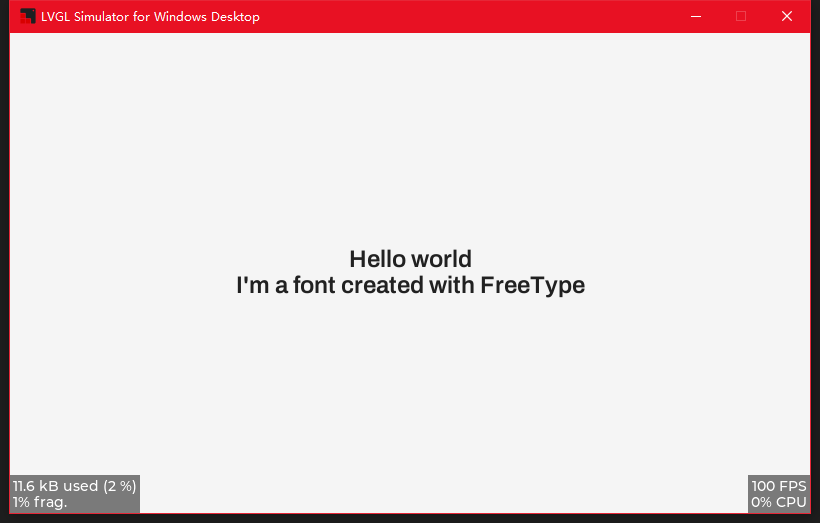
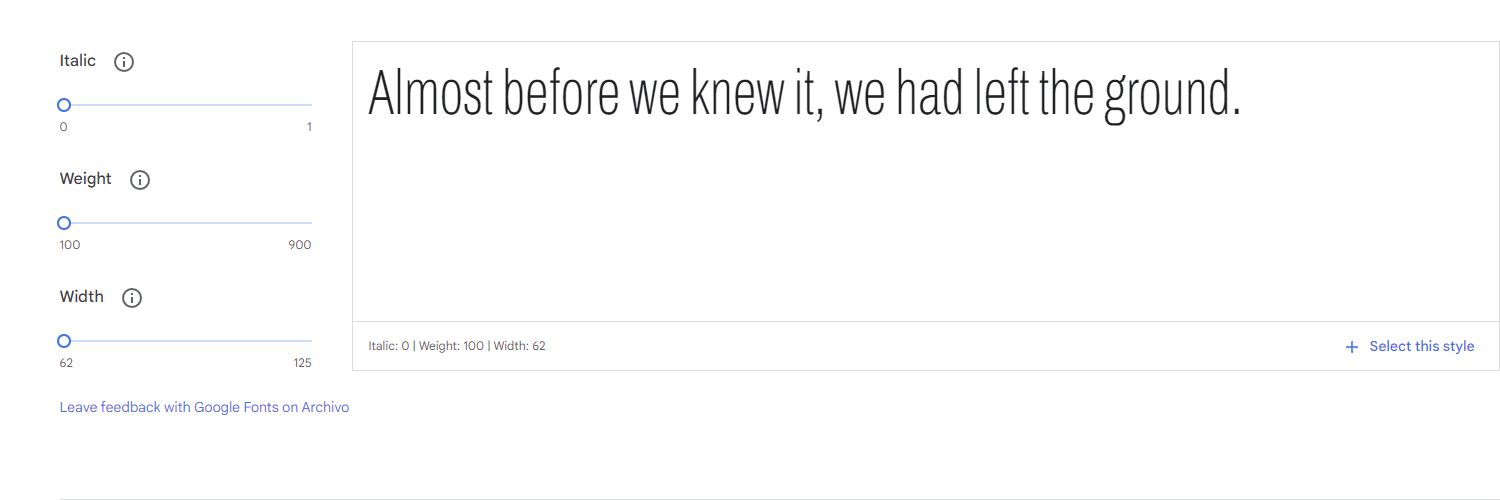
Font online display
Click here to experience the variable properties of the ArchivoVF font online
The variable properties of ArchivoVF are as follows
- Minimum font weight100
- Maximum font weight900
- Minimum width 62
- Maximum width 125
Expand LVGL’s FreeType support
Since the current version of LVGL (8.10-dev) does not have built-in variable fonts parameter control, we need to add this part manually.
Before adding support, here’s a quick look at how to modify variable parameters and their lengthy comments. (You need to use variable fonts for operation, otherwise it will not run normally (including but not limited to crashes and crashes). The font file used for testing is Archivo-VF, which can be obtained at the end of the previous section)
// face的类型为FT_Face
FT_Error error;
FT_MM_Var \*amaster = nullptr;
// 获取可变参数
error = FT_Get_MM_Var(face, &amaster);
printf("error %d\n", error);
// 可变参数数量(每一个可变参数被称为一个axis(轴)))
printf("amaster->axis=%d\n", (amaster)->num_axis);
// 注意:上面提供的Archivo-VF文件只有2个可变轴Weight和Width
// 而amaster->axis是一个指向可变轴数组首位数据的指针
// 可变参数的名称id,在font文件内表'name'的id
printf("amaster->axis->strid=%u\n", amaster->axis->strid);
// 可变参数的内置标签
printf("amaster->axis->tag=%lu\n", amaster->axis->tag);
// 可变参数的名称
printf("amaster->axis->name=%s\n", amaster->axis->name);
// 可变参数的默认值
printf("amaster->axis->def=%ld\n", amaster->axis->def);
// 可变参数的最大值 16.16的定点数 amaster->axis->maximum / 65536; // 除以65536转化
printf("amaster->axis->maximum=%ld\n", amaster->axis->maximum);
// 可变参数的最小值 16.16的定点数 amaster->axis->minimum / 65536; // 除以65536转化
printf("amaster->axis->minimum=%ld\n", amaster->axis->minimum);
// 以前为了获得不同粗细的字体,就需要准备字重Thin,Bold,Normal这样不同字重的文件
// 而引入可变字体后,一个字体文件就内置了这些Thin Bold Normal的对应字重.
// 此处储存了当前轴内置默认值的数量
printf("amaster->num_namedstyles=%d\n", amaster->num_namedstyles); // 此处打印2
// 可变参数的内置num_namedstyle值的数组,以字重为例,里面可能存有(100,200,300,400,500,600,700,800,900)
printf("amaster->namedstyle->coords=%ld\n", (signed long) amaster->namedstyle->coords);
FT_Fixed coords[2] = { (amaster->axis)->maximum ,(amaster->axis + 1)->maximum};
printf("amaster->(axis)->maximum=%ld\n", (amaster->axis)->maximum /65536); // 此处打印900,符合前一节的图中字重最大值
printf("amaster->(axis+1)->maximum=%ld\n", (amaster->axis+1)->maximum /65536); // 此处打印125,符合前一节的图中字宽最大值
// 调整可变参数的值,此处将字重和字宽都设置为最大值
error = FT_Set_Var_Design_Coordinates(face,
2, coords);
printf("FT_Set_Var_Design_Coordinates error %d\n", error);
printf("face num_faces: %ld\n", face->num_faces);
// 使用可变参数的内置num_namedstyle
// styleIndex需要小于上述num_namedstyles
// error = FT_Set_Named_Instance(m_face, styleIndex);
// printf("FT_Set_Named_Instance error %d\n", error);
FT_Done_MM_Var(m_library, amaster);
Since the current version of lvgl (8.1.0-dev) does not provide the corresponding API, some places need to be modified manually. Open lv*freetype.h and modify the content of lv_ft_info_t as shown below
typedef struct {
const char * name; /_ The name of the font file _/
lv*font_t * font; /_ point to lvgl font _/
uint16*t weight; /* font weight _/
uint16_t height; /_ font size _/
uint16_t style; /_ font style \_/
} lv_ft_info_t;
Please note:
lv_ft_info_t itself has a uint16_t attribute called weight, but it was subsequently used for the width and height of the font, so now we need to add height to replace the original weight, so that weight becomes a veritable weight
It is recommended to rename weight to height first, and then change the subsequent use of weight to height. When lv_example_freetype_1 can run successfully again, add “uint16_t weight;”
lv_font_fmt_ft_dsc_tAlso add font weight(weight) Open lv_freetype.c and modify the content of lv_font_fmt_ft_dsc_t as shown below
typedef struct {
##if LV_FREETYPE_CACHE_SIZE >= 0
void *face_id;
##else
FT_Size size;
##endif
lv_font_t *font;
uint16_t style;
uint16_t height;
uint16_t weight;
} lv_font_fmt_ft_dsc_t;
Just add “uint16_t weight;” directly here
Add the code to modify the font weight to get_glyph_dsc_cb_cache in lv*freetype.c
static bool get_glyph_dsc_cb_cache(const lv_font_t * font,
lv*font_glyph_dsc_t * dsc_out, uint32_t unicode_letter, uint32_t unicode_letter_next)
{
LV_UNUSED(unicode_letter_next);
if(unicode_letter < 0x20) {
dsc_out->adv_w = 0;
dsc_out->box_h = 0;
dsc_out->box_w = 0;
dsc_out->ofs_x = 0;
dsc_out->ofs_y = 0;
dsc_out->bpp = 0;
return true;
}

    lv_font_fmt_ft_dsc_t * dsc = (lv_font_fmt_ft_dsc_t *)(font->dsc);

    FTC_FaceID face_id = (FTC_FaceID)dsc->face_id;
    FT_Size face_size;
    struct FTC_ScalerRec_ scaler;
    scaler.face_id = face_id;
    scaler.width = dsc->height;
    scaler.height = dsc->height;
    scaler.pixel = 1;
    if(FTC_Manager_LookupSize(cache_manager, &scaler, &face_size) != 0) {
        return false;
    }


    FT_Face face = face_size->face;

    FT_MM_Var* amaster = NULL;
    FT_Error err = FT_Get_MM_Var(face, &amaster);
    if (err) {
        LV_LOG_ERROR("FT_Get_MM_Var error:%d\n", err);
        return err;
    }
    // 别忘记左移16位,还有一件事,我只修改了字重,没修改字宽,所以数组大小是1
    FT_Fixed coords[1] = { dsc->weight<<16 };
    err = FT_Set_Var_Design_Coordinates(face, 1, coords);
    if (err) {
        LV_LOG_ERROR("FT_Set_Var_Design_Coordinates error:%d\n", err);
        return err;
    }
    FT_Done_MM_Var(library, amaster);

    FT_UInt charmap_index = FT_Get_Charmap_Index(face->charmap);
    FT_UInt glyph_index = FTC_CMapCache_Lookup(cmap_cache, face_id, charmap_index, unicode_letter);
    dsc_out->is_placeholder = glyph_index == 0;

    if(dsc->style & FT_FONT_STYLE_ITALIC) {
        FT_Matrix italic_matrix;
        italic_matrix.xx = 1 << 16;
        italic_matrix.xy = 0x5800;
        italic_matrix.yx = 0;
        italic_matrix.yy = 1 << 16;
        FT_Set_Transform(face, &italic_matrix, NULL);
    }

    if(dsc->style & FT_FONT_STYLE_BOLD) {
        current_face = face;
        if(!get_bold_glyph(font, face, glyph_index, dsc_out)) {
            current_face = NULL;
            return false;
        }
        goto end;
    }

    FTC_ImageTypeRec desc_type;
    desc_type.face_id = face_id;
    desc_type.flags = FT_LOAD_RENDER | FT_LOAD_TARGET_NORMAL;
    desc_type.height = dsc->height;
    desc_type.width = dsc->height;

##if LV_FREETYPE_SBIT_CACHE
FT_Error error = FTC_SBitCache_Lookup(sbit_cache, &desc_type, glyph_index, &sbit, NULL);
if(error) {
LV_LOG_ERROR("SBitCache_Lookup error");
return false;
}

    dsc_out->adv_w = sbit->xadvance;
    dsc_out->box_h = sbit->height;  /*Height of the bitmap in [px]*/
    dsc_out->box_w = sbit->width;   /*Width of the bitmap in [px]*/
    dsc_out->ofs_x = sbit->left;    /*X offset of the bitmap in [pf]*/
    dsc_out->ofs_y = sbit->top - sbit->height; /*Y offset of the bitmap measured from the as line*/
    dsc_out->bpp = 8;               /*Bit per pixel: 1/2/4/8*/

##else
FT_Error error = FTC_ImageCache_Lookup(image_cache, &desc_type, glyph_index, &image_glyph, NULL);
if(error) {
LV_LOG_ERROR("ImageCache_Lookup error");
return false;
}
if(image_glyph->format != FT_GLYPH_FORMAT_BITMAP) {
LV_LOG_ERROR("Glyph_To_Bitmap error");
return false;
}

    FT_BitmapGlyph glyph_bitmap = (FT_BitmapGlyph)image_glyph;
    dsc_out->adv_w = (glyph_bitmap->root.advance.x >> 16);
    dsc_out->box_h = glyph_bitmap->bitmap.rows;         /*Height of the bitmap in [px]*/
    dsc_out->box_w = glyph_bitmap->bitmap.width;        /*Width of the bitmap in [px]*/
    dsc_out->ofs_x = glyph_bitmap->left;                /*X offset of the bitmap in [pf]*/
    dsc_out->ofs_y = glyph_bitmap->top -
                     glyph_bitmap->bitmap.rows;         /*Y offset of the bitmap measured from the as line*/
    dsc_out->bpp = 8;         /*Bit per pixel: 1/2/4/8*/

##endif

end:
if((dsc->style & FT_FONT_STYLE_ITALIC) && (unicode_letter_next == '\0')) {
dsc_out->adv_w = dsc_out->box_w + dsc_out->ofs_x;
}

    return true;

}
When initializing, don’t forget to pass the font weight information when lv*ft_font_init_cache
static bool lv_ft_font_init_cache(lv_ft_info_t * info)
{
lv*font_fmt_ft_dsc_t * dsc = lv_mem_alloc(sizeof(lv_font_fmt_ft_dsc_t));
if(dsc == NULL) return false;

    dsc->font = lv_mem_alloc(sizeof(lv_font_t));
    if(dsc->font == NULL) {
        lv_mem_free(dsc);
        return false;
    }
    lv_memset_00(dsc->font, sizeof(lv_font_t));
    lv_face_info_t * face_info = NULL;
    face_info = lv_mem_alloc(sizeof(lv_face_info_t) + strlen(info->name) + 1);
    if(face_info == NULL) {
        goto Fail;
    }
    face_info->mem = info->mem;
    face_info->size = info->mem_size;
    face_info->name = ((char *)face_info) + sizeof(lv_face_info_t);
    strcpy(face_info->name, info->name);

    dsc->face_id = face_info;
    dsc->height = info->height;
    dsc->weight = info->weight;
    dsc->style = info->style;

    /* use to get font info */
    FT_Size face_size;
    struct FTC_ScalerRec_ scaler;
    scaler.face_id = (FTC_FaceID)dsc->face_id;
    scaler.width = info->height;
    scaler.height = info->height;
    scaler.pixel = 1;
    FT_Error error = FTC_Manager_LookupSize(cache_manager, &scaler, &face_size);
    if(error) {
        lv_mem_free(face_info);
        LV_LOG_ERROR("Failed to LookupSize");
        goto Fail;
    }

    lv_font_t * font = dsc->font;
    font->dsc = dsc;
    font->get_glyph_dsc = get_glyph_dsc_cb_cache;
    font->get_glyph_bitmap = get_glyph_bitmap_cb_cache;
    font->subpx = LV_FONT_SUBPX_NONE;
    font->line_height = (face_size->face->size->metrics.height >> 6);
    font->base_line = -(face_size->face->size->metrics.descender >> 6);

    FT_Fixed scale = face_size->face->size->metrics.y_scale;
    int8_t thickness = FT_MulFix(scale, face_size->face->underline_thickness) >> 6;
    font->underline_position = FT_MulFix(scale, face_size->face->underline_position) >> 6;
    font->underline_thickness = thickness < 1 ? 1 : thickness;

    /* return to user */
    info->font = font;

    return true;

Fail:
lv_mem_free(dsc->font);
lv_mem_free(dsc);
return false;
}
Effect preview
If nothing else, the places that need to be modified have been modified. Now go back to lv_example_freetype_1. When initializing the info, the weight is also initialized.
// 由于已经知道了要使用的Archivo-VF最大字重900;
info.weight = 900 ;
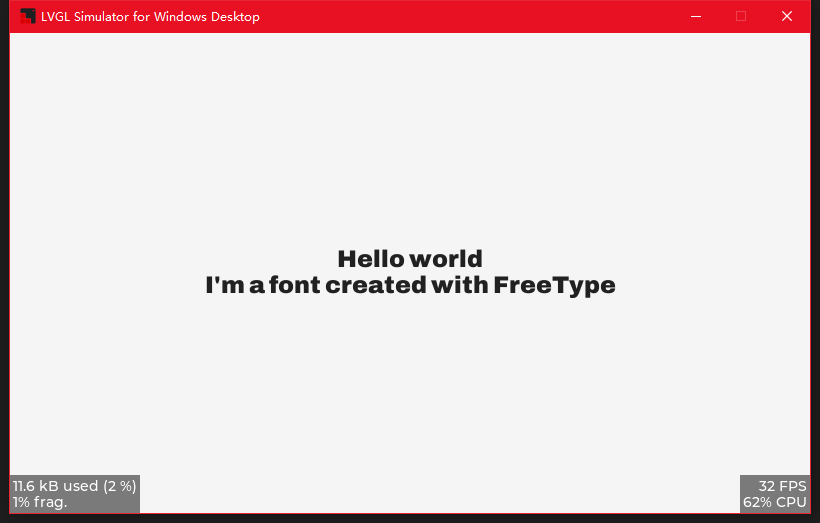
Then run it and you can see Archivo-VF with font weight900
The picture below is the running effect on the LVGL simulator.
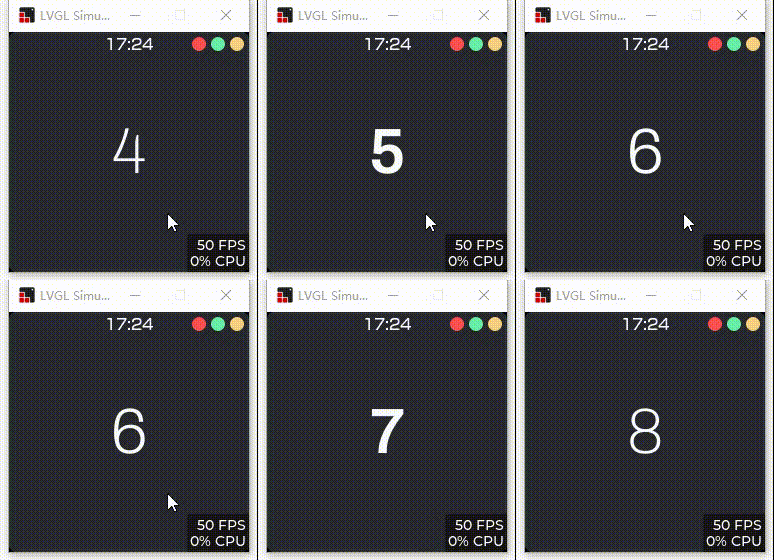
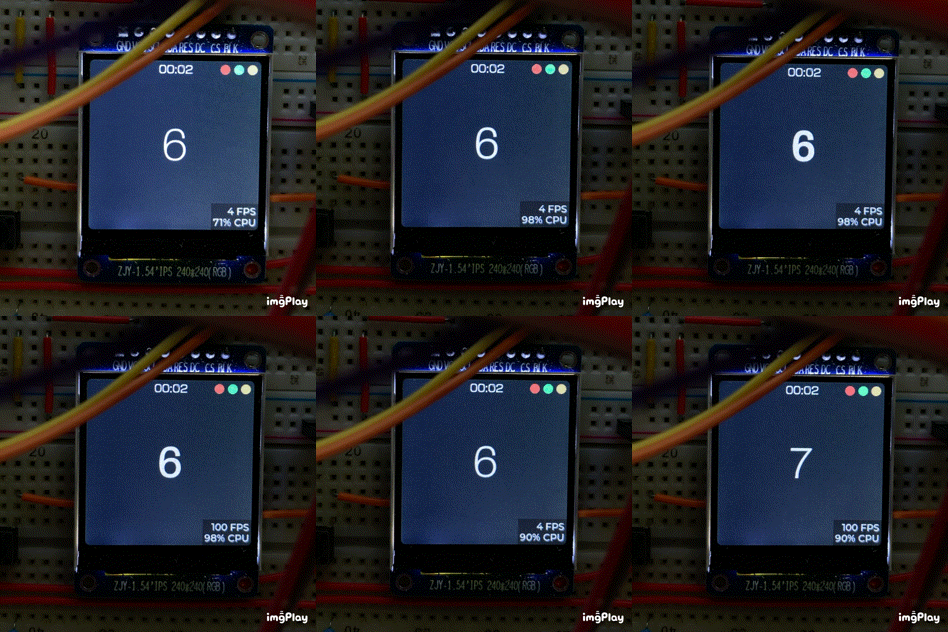
Next episode preview
environment
Windows 10 Pro 18363.1556
Microsoft Visual Studio Community 2019 16.6.2
LVGL 8.1.1-dev
FreeType 2.11.0
References
- http://www.cppblog.com/cokecoffe/archive/2011/09/07/155264.html
- https://mingplusplus.com/tech/2014/09/13/freetype/
- https://baike.baidu.com/item/freetype/6281493?fr=aladdin
- https://www.arphic.com.cn/2017/09/28/variable-font-%E5%8F%AF%E5%8F%98%E5%AD%97%E4%BD%93/
- https://zh.wikipedia.org/wiki/FreeType