background
The previous blog post on the MCompass project attracted a lot of traffic, and I was pleasantly surprised by the data in the Cloudflare backend. I originally thought about making this small device into a product, but the copyright and mass production costs were really prohibitive. So I began to wonder if I could use a mature platform like AdSense to convert this traffic into some server costs for maintaining the website.
Unexpectedly, Google sent me an “Action Required” receipt on several consecutive applications. The letter stated that the application needed to be adjusted, but the specific “painful aspects” were not clearly stated.
I realized that it wasn’t enough to just pile on the content, and that the site’s “technical hygiene”, aka SEO and crawl compliance, may have been rotten. So, I decided to do a complete bottom-level cleanup of the blog.
Diagnosis: First look at me as Google sees me
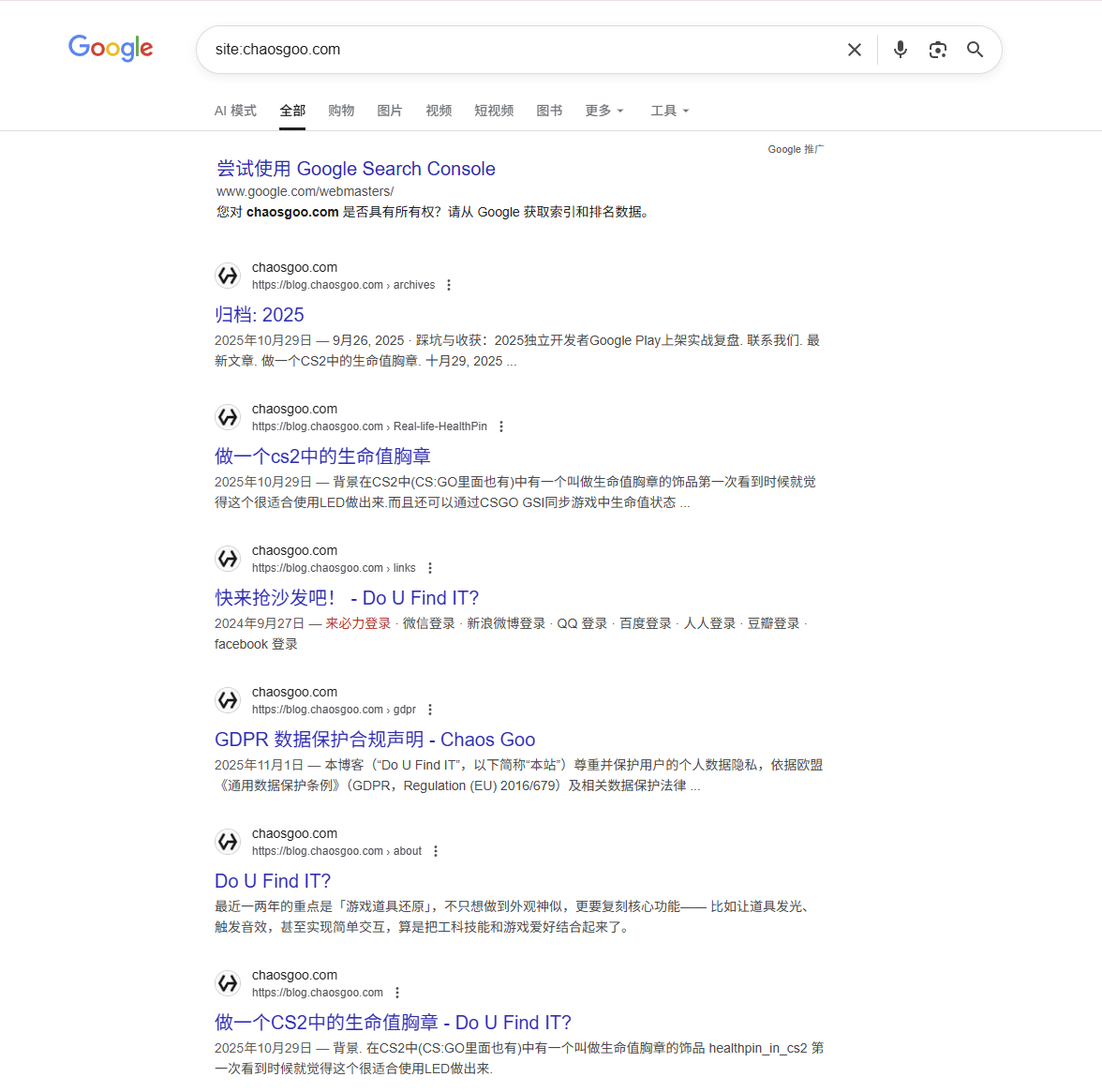
The first step is to figure out what “Google sees me” like. The search engine has a command that specifically specifies the search content called site. To use it, add site: xxx.com in front of the search content, so that the search results will only come from the sites we specify.
The “horrible” current situation of the site: command
Searching the website inclusion status, not only does the first page of content not contain the root domain name, but also incorrectly includes irrelevant content under the blog domain name.
For example, this inexplicable link address of “Come and grab the sofa!” is followed by a page related to the compass domain name.
Action 1: “Disconnect” from the content
Delete those articles that make up the numbers
I looked through old files and found that the notes I wrote when I was learning Kotlin a few years ago were terrible. Basically, it’s just rereading the official documents, plus a bunch of meaningless talking to myself. It’s okay to store these things on your computer and read them yourself, but putting them online is really a waste of the crawler’s energy.
There are also some early Blender practice demonstrations with just a few pictures and no technical details. What AdSense wants is content with original depth. This kind of “thin content” with a heavy “transportation feeling” must be cleaned up.
Although I was a little reluctant to part with it, I still cut off the number of articles from 58 to 22.
Clean up low-value articles
A few years ago, I had a period of time studying Kotlin. At that time, in order to deepen my impression, I wrote some notes on studying Kotlin, but the notes were basically just manually typing the contents of the official document.
Moreover, there are a lot of self-talks. This kind of article is actually of minimal help to other people. It is suitable to be stored in some special note-taking tools (such as notion), so it is the first priority to clean up.
In addition, on some days between 19 and 20, I also used Blender to create. The content simply shared the creation results without going into in-depth production techniques and details. This type of article is also likely to be judged as a low-value article and will also be included in the cleanup targets.
AdSense places a high value on**‘original value’. Content that simply ‘transports documents’ or ‘talks to oneself’ can easily be judged as ‘Thin Content’**. In order not to drag down the rating of the entire website, I have to cut off my strength.
After careful inspection, the original 58 articles were reduced to 22 articles.
Fix link errors
Among the 22 articles that have been retained, the pictures and video links inside have become invalid due to the multiple migrations of the blog.
This cannot be tolerated because crawlers will detect it, so if you can repair the dead link, you must repair it.
My repair is relatively simple, because it is just missing ?raw=true, just add it.
Article content optimization
Some of the 22 articles are highly original, but the content is slightly simple. We can optimize and expand them to make them of real value. For example, my CS2 badge article introduced the component selection strategy in detail, and Aurora added the Script Device method.
Action 2: Solve the four technical sticking points
1. Domain name fight (301 redirect)
My website domain name change history is a bit messy. First it was blog.chaosgoo.com, and then I tried www. When applying for AdSense, you must submit the root domain name (chaosgoo.com). As a result, the search results are now filled with a bunch of expired second-level domain names, and the weight is completely dispersed.
My site has been deployed on blog. for a long time in the past, and the root domain name (chaosgoo.com) has been idle.
When applying for AdSense, it was required to fill in the root domain name, not the blog.domain name, so a few months ago, it was specifically migrated to the root domain name.
Some time ago, the website was also deployed on www, so the results retrieved by the site: command can see two “abandoned” domain names blog. and www. in the “pollution” index.
In order to increase the weight of the root domain name and keep the search results clean and clear, these two old domain names need to be cleaned up.
Old domain name processing
Page rules
Thanks to the cyber benevolent Cloudflare for providing many convenient tools.
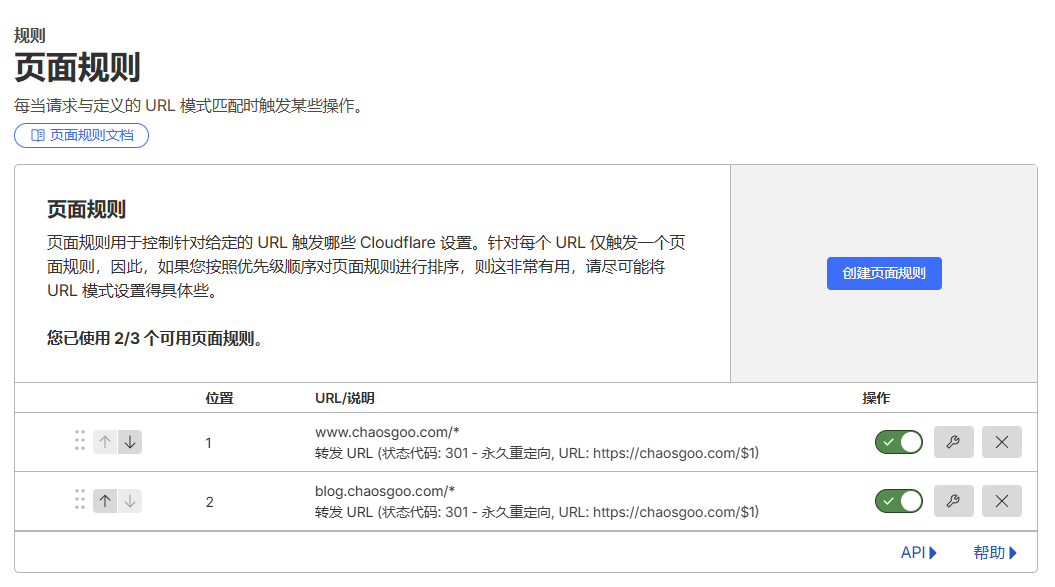
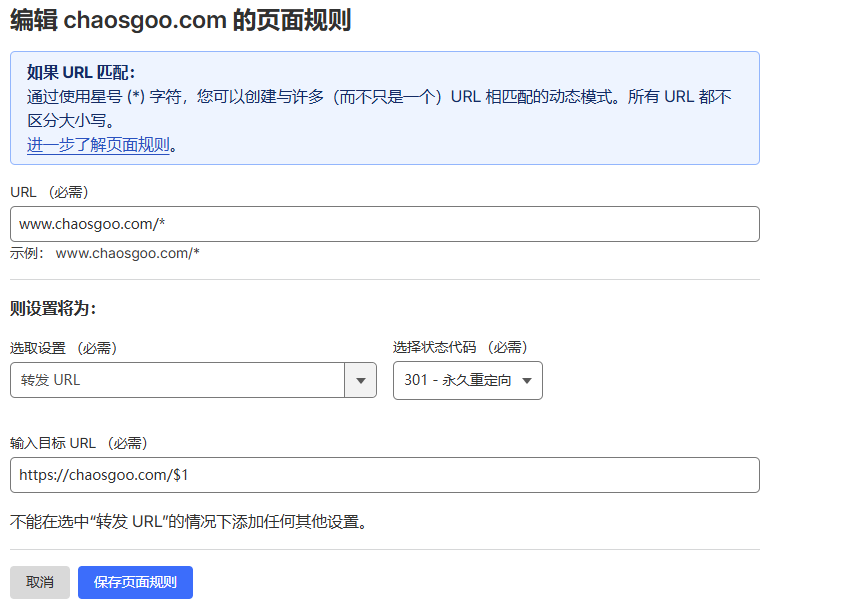
Here we go to the cloudflare console, find the page rule, and add redirection rules for the two old domain names www. and blog..
The parameters are shown in the figure below:
Cloudflare parsing optimization
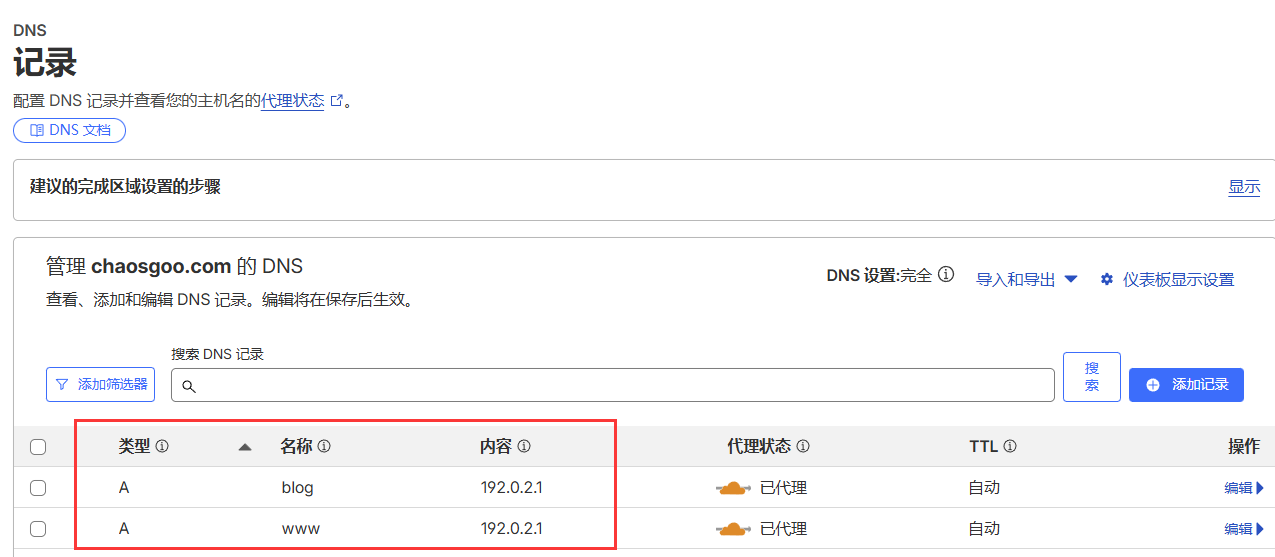
After configuring the page rules, everything is not fine. You still need to add two virtual A records in the parsing process.
Special note: The proxy status of this A record must be turned on (lit up with an orange cloud), otherwise Cloudflare's page rules cannot take over the traffic.
Important: without this step, the page rules will not take effect.
#2: Index Pollution (Robots Firewall)
Do you still remember the irrelevant content related to the tags page that you saw using the site: command?
Next we need to remove it from the search results.
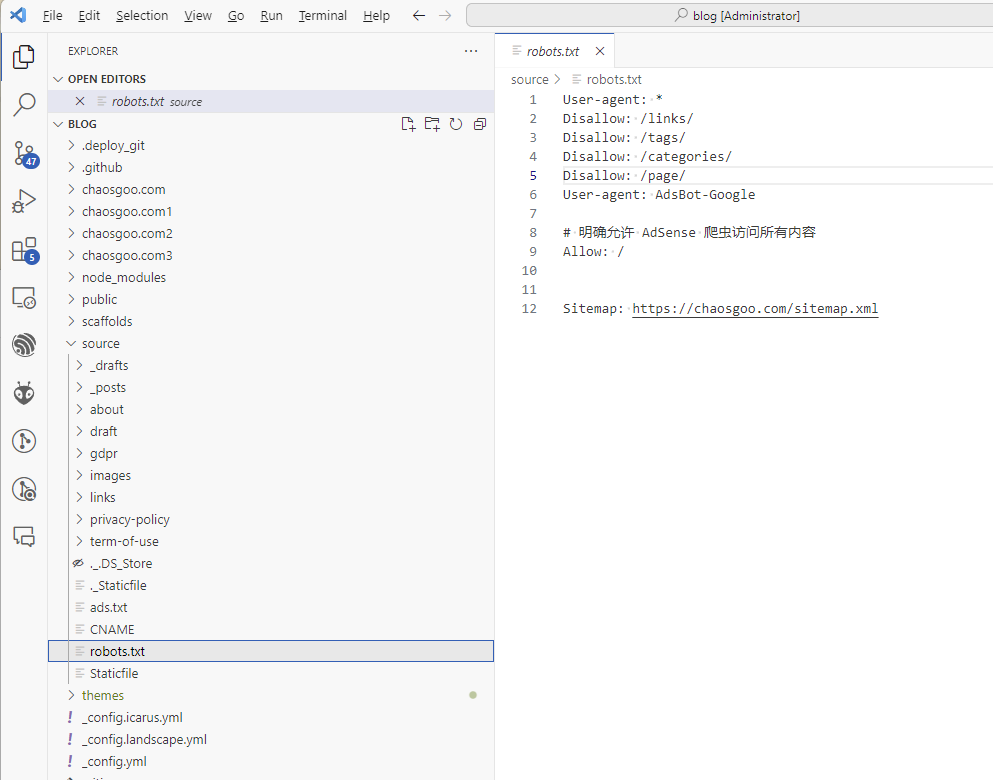
robots.txt content optimization
We need to proactively tell the crawler robots that these pages are unnecessary and please do not crawl these contents.
Write the following robots.txt rules
#3: Map Chaos (Sitemap Whitelisting)
Although we have manually written the robots.txt rule to tell Google not to crawl the specified content, the content still exists in the sitemap.
In order to ensure the uniformity of content specifications, it is necessary to mark unwanted content so that it does not appear in the sitemap.
hexo-generator-sitemap plug-in installation
My blog is generated by hexo, so I use hexo-specific sitemap generation tool, hexo-generator-sitemap
The installation is very simple, you only need to enter in the root directory of the blog source file
npm install hexo-generator-sitemap --savehexo-generator-sitemap usage
It is also very simple to use. You only need to configure the rules in _config.yml in the root directory.
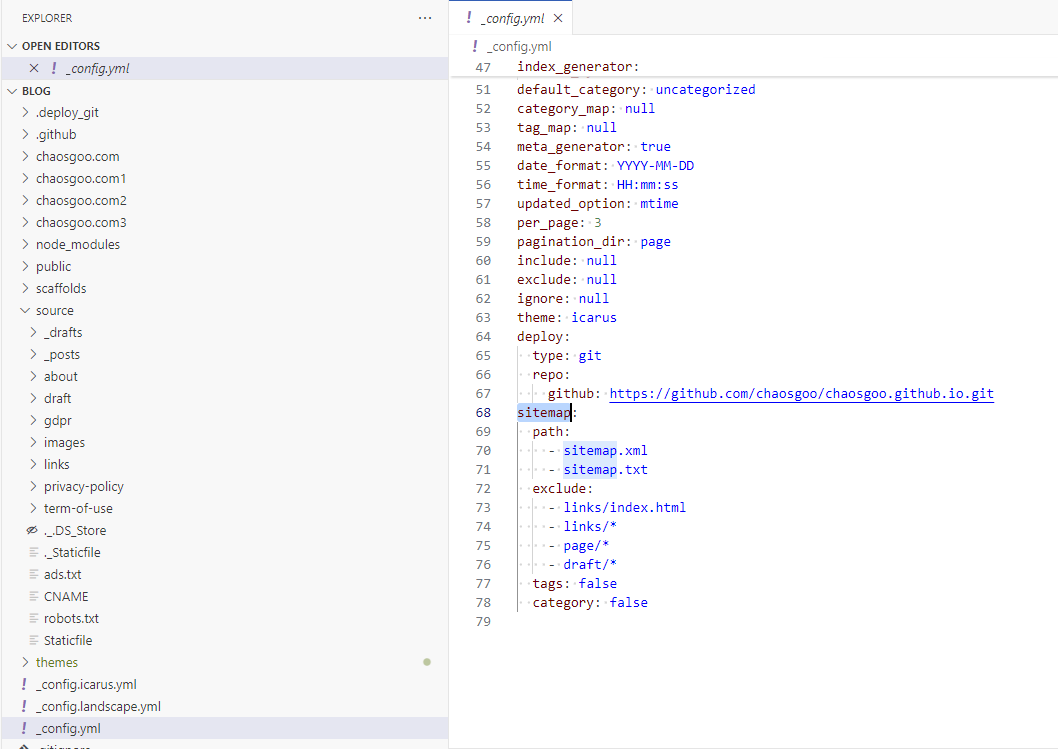
This plug-in will automatically generate a sitemap for hexo g.
#4: Fix Canonical (fatal error)
Do you still remember the mentioned in the previous section GSC's final verdict? The web page was not included in the contact: Duplicate web page, the user did not select the canonical web page
This is because our website page lacks the canonical tag. Google does not know which one is the canonical web page, blog. or the root version, and based on experience, it selected the blog. version that has long been included as the canonical version to appear in the search results.
troubleshooting
Because generally speaking, hexo’s theme will automatically generate canonical tags for us. So I opened the homepage of the site, pressed F12 to inspect the elements, and found that the homepage did not have the canonical mark, but when I clicked on a few articles, I saw the canonical mark again, which was very strange.
I thought it was the ‘zombie cache’ (db.json). After cleaning it, I regenerated the page and checked, but there was still no canonical mark.
Could it be that the url in _config.yml is not configured? It is not correct, because I have already configured this attribute.
So I decided to search the source code to check the generation rules of this thing.
Manual labeling canonical
The code logic for generating canonical tags in my theme is, The homepage does not have the concept of page. The ternary operator here calculates null, so you need to manually modify the logic here as
// 修改前 (Bug): 主页的 page.permalink 为空,导致 canonical 为空
{
  canonical_url ? <link rel="canonical" href={canonical_url} /> : null;
}

// 修改后 (Fix): 强制回退使用 url 配置
{
  <link rel="canonical" href={page.permalink || url} />;
}
After saving, regenerate the page for local deployment. Use F12 to inspect the elements and successfully see that the homepage also has the canonical mark. Finally, you are done.
redeploy site
Now that we have fixed the blog’s robots.txt, sitemap.xml and canonical markup, we can redeploy.
Action 3: Push Google to update your “memory”
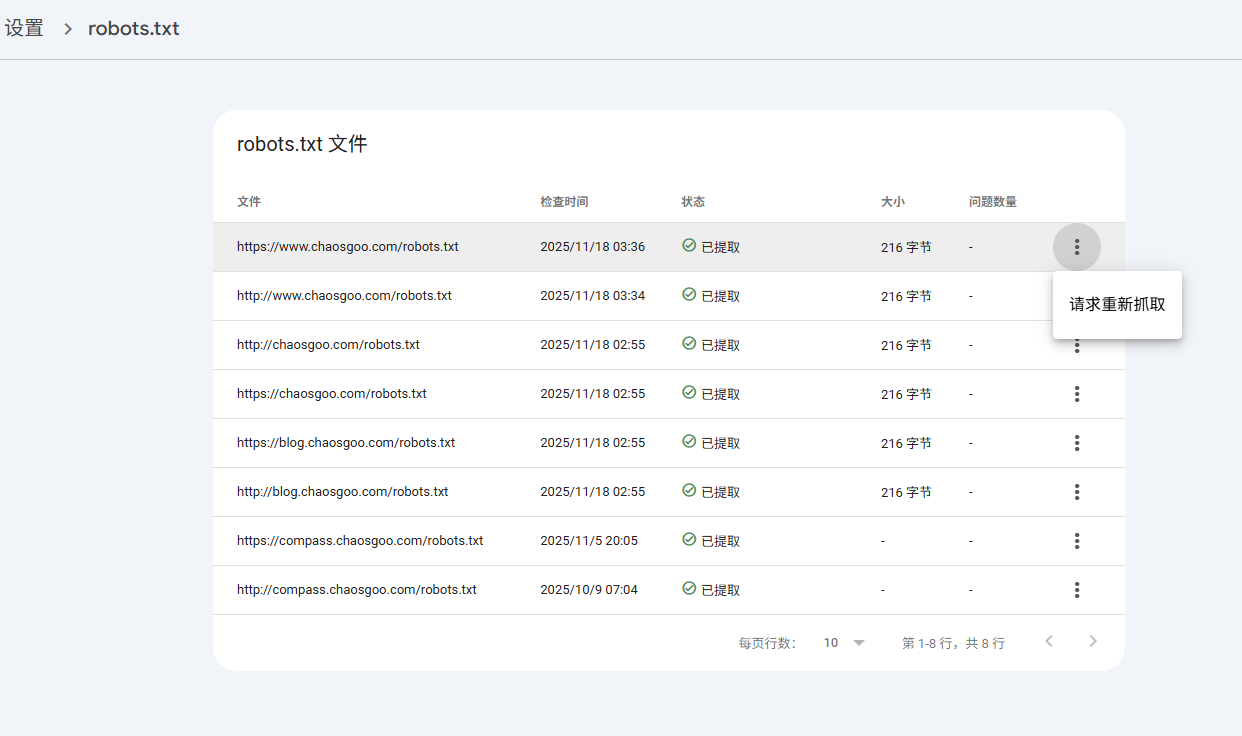
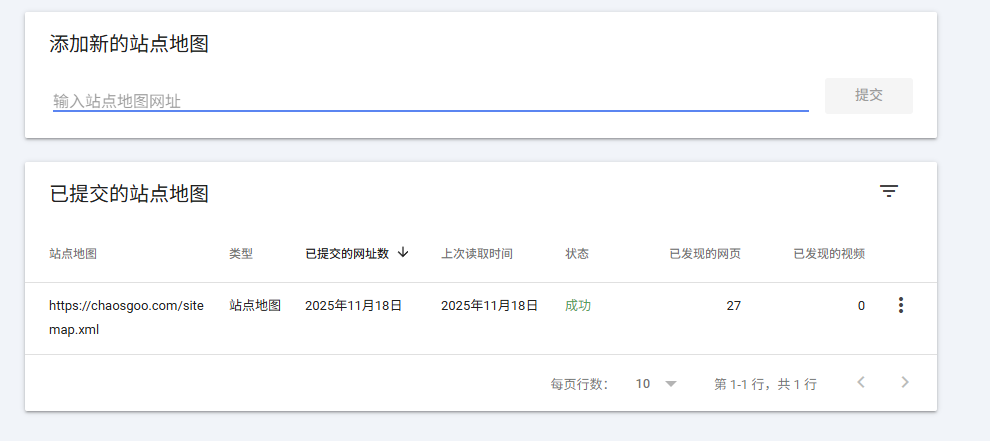
After just changing the code, I have to take the initiative to tell GSC to delete the old and messy indexes. In order to speed up the repair, we can actively tell Google where the sitemap is on Google Search Console, and the rotots.txt rules can be re-crawled.
Apply to re-crawl robots.txt
Actively submit the sitemap.xml file
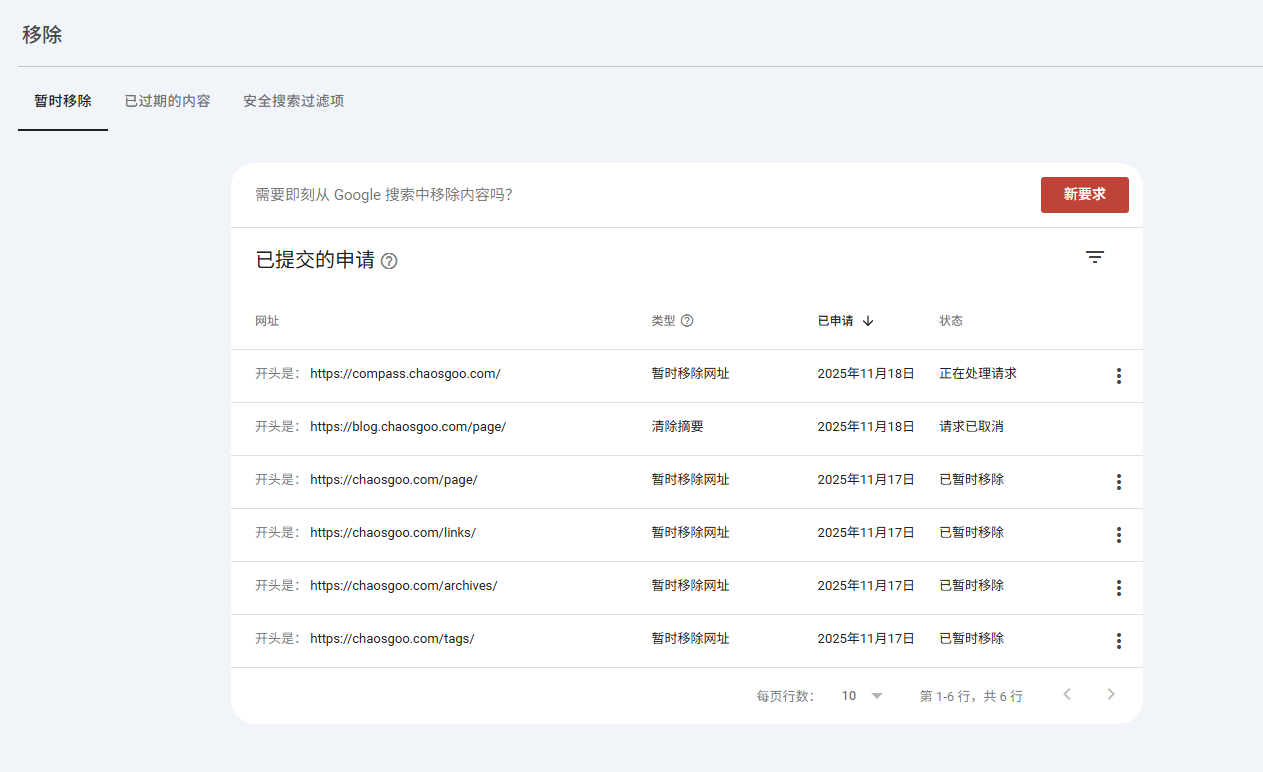
Submit request to hide search results
You can also use the removal function to remove unwanted web pages.
Here I want to remove content like tags, links, so I created the following request
Summary
After doing the above operations, all that’s left is to wait patiently for Google’s robots to crawl the web page, which takes about 2 days.
When I reviewed the webpage, I saw that the root domain name had been correctly included.
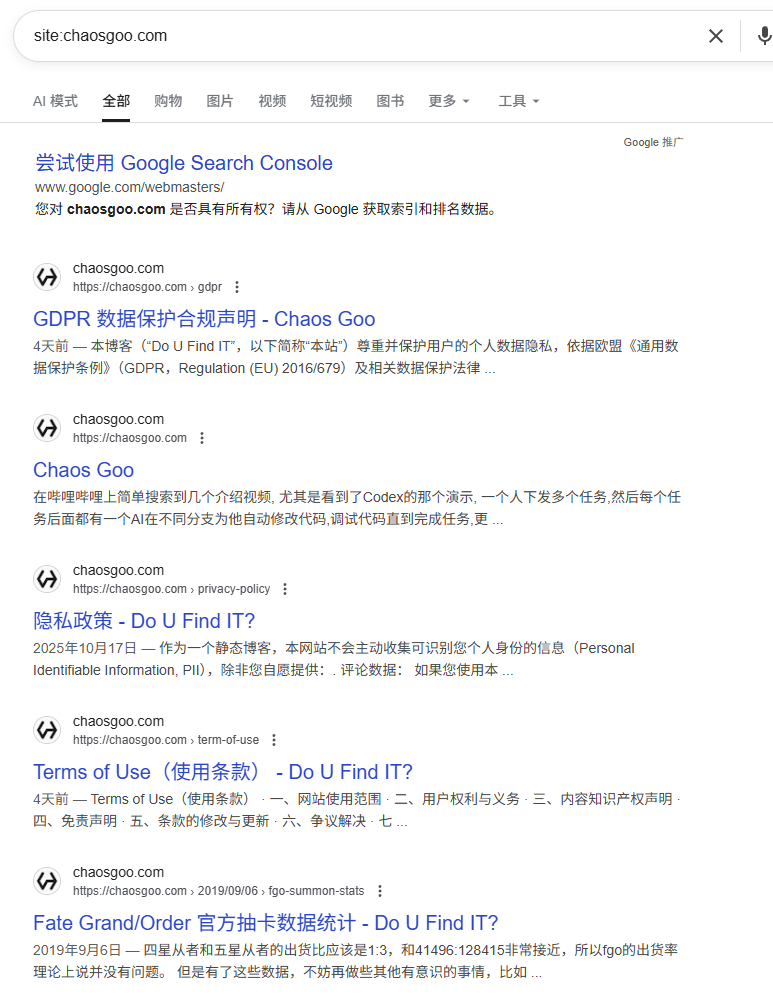
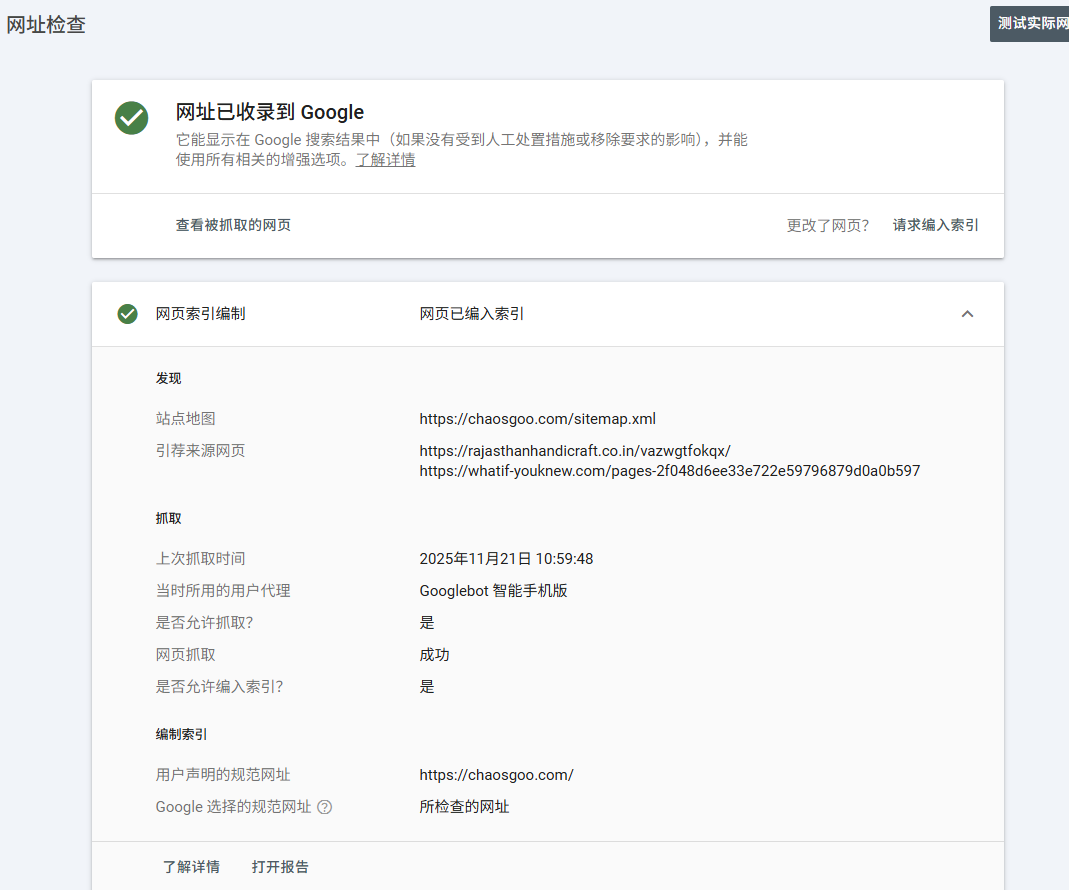 Moreover, the content of the
 site: command has also become much cleaner, with basically only a small number of blog. connections left.
This investigation made me understand that SEO is not a metaphysics, but the ultimate control of details. Although the AdSense application is still on the way, looking at the upward inclusion curve in GSC, I know that I am ready.